This guide contains affiliate links. If you buy through them, we may earn a small commission at no extra cost to you.
We have not tested these devices ourselves. This guide compiles each brand’s published specs and plan terms, CDC falls data, and patterns in verified buyer reviews.
⚡ Quick Answer
Bay Alarm Medical is a strong, low-cost choice for most families: no long-term contract, a 15-day trial, two US monitoring centers and optional fall detection on every current device. Pick the SOS Home if your parent mostly stays home, the SOS All-In-One 2 for one device that works at home and away (best all-rounder), the SOS Micro for a tiny GPS button in town, and the SOS Smartwatch if they would rather wear a watch than a pendant. The main trade-offs: cancelling takes a phone call and a device return, and mobile devices need regular charging.
Bay Alarm Medical comes up on almost every shortlist of medical alert companies, usually because of its low starting price and no-contract plans. If you are shopping for a parent, or for yourself, the real question is which of its devices fits daily life, what it costs once fall detection and device fees are added, and how easy it is to cancel if plans change.
This review walks through every device Bay Alarm Medical currently lists, its monitoring centers, fall detection, pricing, contract and cancellation terms, setup and the caregiver app. We also summarize what customers say on Trustpilot, the BBB and Amazon, and compare it with two close rivals, Medical Guardian and LifeFone. Facts come from the brand’s own pages and the review pages we opened at the time of writing.
Table of Contents
Bay Alarm Medical at a Glance
Who runs it: a family-owned company based in Concord, California. Its site says Bay Alarm dates back to the 1940s and has run a dedicated medical alert company for nearly two decades, led today by the founders’ grandson.
Devices: SOS Home (landline or cellular), SOS All-In-One 2, SOS Micro and SOS Smartwatch on the current pricing page, plus the older SOS Mobile.
Monitoring: two US monitoring centers in Ogden, Utah and Rexburg, Idaho, both CSAA Five Diamond certified, with support for 180 languages, per the brand.
Contract: no long-term contract, a 15-day refund policy, and prorated refunds for unused months after that (less shipping).
Fall detection: optional on all current devices, about $10 more per month at the time of writing.
Ratings we saw: 4.8 out of 5 from 3,000+ reviews on Trustpilot and an A+ BBB rating (accredited for more than 15 years).
Why a Medical Alert Matters More After 50
Falls are the main reason families look at a service like Bay Alarm Medical. According to the CDC’s Facts About Older Adult Falls, more than one in four adults age 65 and older falls each year, yet less than half tell their doctor. Falling once doubles the chance of falling again, and CDC reports about 4.5 million emergency department visits each year from falls in older adults.
A medical alert does not prevent falls. What it does is shorten the time between a fall and help arriving, which matters most for anyone who lives alone or spends long stretches of the day by themselves. With a monitored service like Bay Alarm, one press of a button connects to a trained operator who can call 911, a neighbor or family, and fall detection can place that call automatically if the wearer cannot.
Bay Alarm Medical Devices Compared
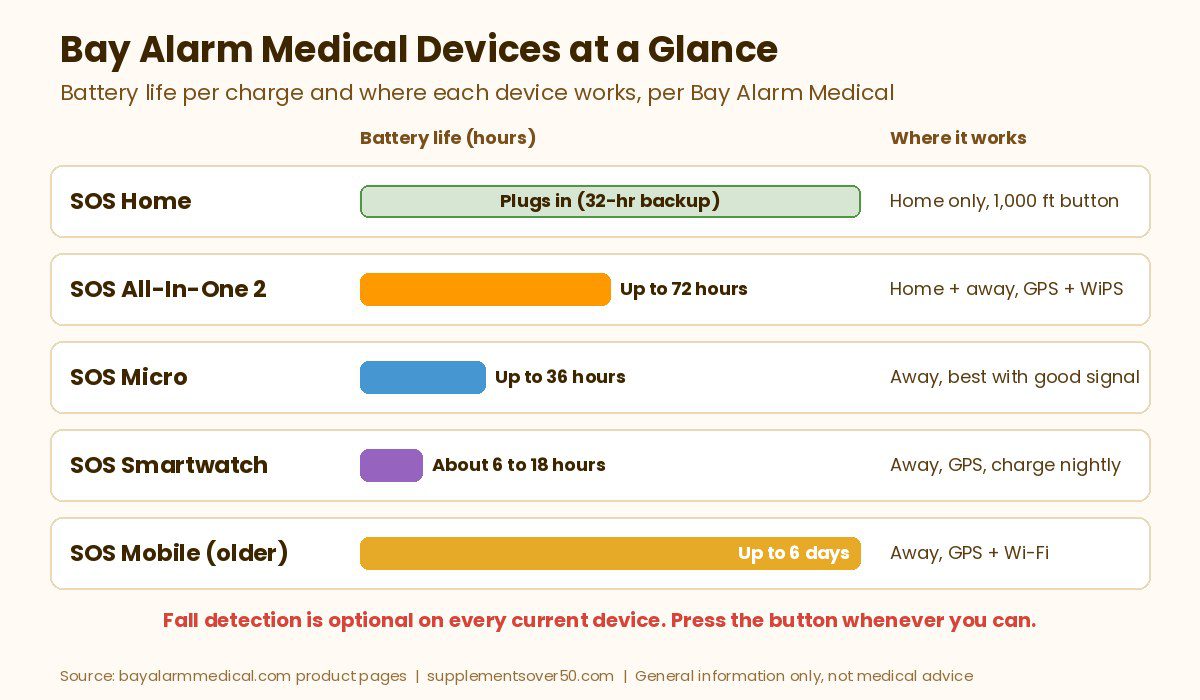
Here is how the current line-up compares. Monthly figures are the starting rates Bay Alarm listed at the time of writing, without fall detection. Prices and promotions change often, so check current pricing before you order.
Device
Best for
Where it works
Battery
Caregiver app
Starting cost
SOS Home (landline or cellular)
Seniors who mostly stay home
Home only, button range up to 1,000 ft
Plugs in, 32-hour backup
No
About $27.95/mo landline, $34.95/mo cellular; console leased free
SOS All-In-One 2
Best all-rounder, home and away
Anywhere with cell coverage (GPS + WiPS)
Up to 72 hours
Yes
About $34.95/mo plus device (listed at $149 before promotions)
SOS Micro
Small, discreet button for active seniors
Anywhere with good cell or Wi-Fi signal
Up to 36 hours
Yes
About $34.95/mo plus device (listed at $149 before promotions)
SOS Smartwatch
People who prefer a watch
Anywhere with cell coverage (GPS)
About 6 to 18 hours
Yes
About $39.95/mo plus device (listed at $199 before promotions)
SOS Mobile (older model)
Longest battery on the go
Anywhere with cell coverage (GPS + Wi-Fi)
Up to 6 days
Yes
Not on the current pricing page; ask Bay Alarm
All of the wearable devices are rated IP67 water resistant, and Bay Alarm says they can be worn in the shower as long as they are not submerged. Cellular service on AT&T or Verizon 4G LTE is included in the monthly fee, so there is no separate phone bill.
Bay Alarm Medical Devices Explained
SOS Home: The Budget In-Home System
The SOS Home is Bay Alarm’s classic setup: a base unit with a loud two-way speaker, a built-in help button and a 32-hour backup battery, plus a waterproof wearable button for the wrist or neck. The button works up to 1,000 feet from the base and, per the brand, the standard button battery lasts 5 years (2 years for fall detection buttons). It comes in landline and 4G LTE cellular versions, and the console is leased free of charge but must be returned if you cancel.
At the time of writing, the pricing page listed SOS Home Landline from about $27.95 a month, SOS Home Cellular from about $34.95 a month and SOS Home Cellular with fall detection at about $44.95 a month, with a one-time fee of about $30 for the fall detection button. Optional wall buttons (about $35 each or a 4-pack for about $130) can be placed low near the toilet, bed or stairs for times your parent is not wearing the pendant. There is no caregiver app or GPS, because the system stays at home.
SOS All-In-One 2: Best for Home and Away
The SOS All-In-One 2 is the device Bay Alarm labels most popular, and it is the one we would look at first for most active seniors. It is a single small unit (about 1.9 ounces) with a help button, two-way speaker, GPS and WiPS location tracking that the brand says works indoors and out, and up to 72 hours of battery life. You can wear it on the included lanyard or belt clip, and some packages add a light wearable button to use at home while the main unit charges.
The trade-offs, which Bay Alarm states itself: the speaker is not as loud as the SOS Home base, and the optional home button reaches about 600 feet instead of 1,000. The unit contains a magnet, so the brand suggests pacemaker users keep it in the belt pouch. Pricing was about $34.95 a month, or about $44.95 with fall detection, plus a device purchase listed at $149 (shown at a promotional discount when we checked).
SOS Micro: Smallest GPS Button
The SOS Micro weighs about 0.7 ounces and can be worn as a watch, a necklace or on a belt clip. It runs on AT&T or Verizon 4G LTE, lasts up to 36 hours per charge and includes caregiver tracking. It finds the wearer mainly through Wi-Fi positioning and cellular signals, and Bay Alarm itself says it does not generally recommend the Micro for rural areas with weak cell or Wi-Fi signals. In those cases it points buyers to the All-In-One 2.
At the time of writing, the SOS Micro started at about $34.95 a month (about $44.95 with fall detection) and required a device purchase listed at $149 before promotions. A 360 Bundle that pairs the Micro with an in-home system was listed at about $59.95 a month. The Micro is also listed on Amazon, sold by Bay Alarm Medical, but it still has to be activated with a monitoring plan by phone.
SOS Smartwatch: For People Who Will Not Wear a Pendant
The SOS Smartwatch is a standalone medical alert watch with its own cellular connection, so no smartphone is needed. It has a bright red physical SOS button on the side, a built-in speaker and microphone, GPS, a step counter and local weather, and optional AI-powered fall detection that asks the wearer to confirm or cancel a detected fall. It is IP67 water resistant.
The catch is battery life. Bay Alarm lists about 6 to 18 hours depending on settings and signal, with 2 to 3 hours to recharge, so it has to go on the charger every night. Pricing was about $39.95 a month, or about $49.95 with fall detection, plus a device listed at $199 before promotions. One note: the watch’s own FAQ is inconsistent about caregiver tracking (one answer says only the monitoring center can track it, another says the caregiver app shows its location), so confirm app features when you order.
SOS Mobile and In-Car Coverage
The SOS Mobile is an older on-the-go device with GPS and Wi-Fi location, IP67 water resistance and up to 6 days of battery life, the longest of any Bay Alarm wearable. Its product page now says it is sold exclusively on Amazon, and it does not appear on the main pricing page. Bay Alarm’s FAQ also still mentions an in-car medical alert device, but we could not find a current product page or price for one, so ask the company directly if car coverage matters to you. For most people, the All-In-One 2 or Micro now covers the car as well.
BEST VALUE MONITORED SERVICE
Bay Alarm Medical
In-home and GPS devices, optional fall detection on every current model, two US monitoring centers with CSAA Five Diamond status, free spouse monitoring on home systems and no long-term contract, per the brand.
Fall detection is an add-on with every current Bay Alarm device. The sensor looks for a sudden downward movement followed by no movement and then calls the monitoring center without a button press. Bay Alarm’s fall detection page lists the cost as an additional $10 per month for SOS Home, SOS All-In-One and SOS Mobile, and the pricing page shows the same $10 step for the Micro and Smartwatch plans.
Bay Alarm is unusually candid about limits. Its page says there is no such thing as a 100% accurate fall detection system, that it should be a backup to pressing the button, and that it should not be used by people with memory loss or seizures or who refuse to press the button themselves. It recommends the feature for people who have fallen before, are prone to fainting or are not confident they could press a button. The All-In-One 2 is optimized for fall detection when worn around the neck, and the Micro’s neck lanyard is the preferred way to wear it with fall detection.
Expect some false alarms. Several reviewers on Trustpilot describe the pendant going off while they bent over or bumped into something; most say operators simply called to check, while a few found frequent false alarms frustrating. There are also a small number of reviews describing falls that the sensor did not catch, which is exactly why every brand tells wearers to press the button whenever they can.
Monitoring Centers and Response
Bay Alarm says its 24/7 monitoring runs through a US-based partner with two centers, in Ogden, Utah and Rexburg, Idaho, that are full duplicates of each other, so if one goes offline the other takes over. Both are UL listed and CSAA Five Diamond certified, according to the brand, and operators support 180 languages. Customer service runs separately from the company headquarters in California.
The product spec tables list a monitoring center response time of 45 seconds or less. Treat that as the brand’s own figure. When a call comes in, the operator talks through the base unit or device, checks what is wrong and calls the people on your emergency list or 911. You can set the list so family or neighbors are called before 911, and Bay Alarm says there are never fees for false alarms. It encourages customers to test the system once a month.
Bay Alarm Medical Pricing, Contract and Cancellation
At the time of writing, starting monthly prices were about $27.95 (SOS Home Landline), $34.95 (SOS Home Cellular, All-In-One 2 and Micro) and $39.95 (Smartwatch), with fall detection adding about $10. The in-home console is leased free, while the All-In-One 2, Micro and Smartwatch require a device purchase. The site was running a large promotion when we checked, with device discounts, free shipping and a free month on select plans, so check current pricing and read exactly which plan a promotion applies to.
Billing: monthly, quarterly or annual payments by Visa, Mastercard or Discover (no American Express, per the FAQ). HSA and FSA cards are accepted for online orders.
No long-term contract: service can be cancelled at any time without cancellation fees, per the brand.
15-day refund policy: the 15 days start when you receive the system. Return it within that window for a full refund less shipping. After 15 days you may get a prorated refund for unused months, less shipping.
Cancelling takes a call: online cancellation is only available when the user has passed away. For any other reason you phone a care advocate, power the device down and ship it back.
Return the device: in-home accounts close once the leased console is returned and inspected. Bay Alarm does not provide boxes or shipping labels, and it says the process takes 2 to 3 weeks on average, with refunds for any charges during that time based on the postmark date.
Free spouse monitoring: add a second button for a spouse or another family member in the same home and Bay Alarm monitors it at no extra monthly cost (you pay for the button).
Insurance: the FAQ says long-term care insurance can cover medical alert costs, and other insurers that cover it usually reimburse you directly. Check with your plan.
Extras: a Vial of Life medical info kit comes with SOS Home; a lockbox is about $30, and an optional protection plan covers one replacement unit per year and 50% off lost or damaged accessories.
Setup and the Caregiver App
Setup is simple by design. The SOS Home plugs into a wall outlet that is not controlled by a light switch; the landline version also shares an existing phone jack, while the cellular version only needs power and an on switch. Mobile devices arrive activated and charge in a cradle. Bay Alarm’s help guides and videos walk through testing, and the brand recommends a test press on day one and once a month after that.
The Bay Alarm Medical app lets the account holder update emergency contacts and home entry information, make payments and check account history. Caregiver tracking, which shows the device’s location, location history and battery level and can ring a misplaced device, works with the All-In-One 2, Micro, Smartwatch and SOS Mobile, but not the SOS Home. Access is limited to one email per account at the time of writing, which is worth knowing if several siblings share caregiving.
If you want responders to get in without forcing a door, a key lockbox helps. Bay Alarm sells its own, and its app stores home entry information. If you prefer to buy one yourself, the Puroma Key Lock Box is the #1 best seller in security lock boxes on Amazon (4.6 out of 5 from 7,700+ ratings when we checked). Its listing describes a resettable 4-digit combination, a removable shackle to hang it on a door knob or screws to mount it on a wall, and a weatherproof, rust-resistant metal body. Ask Bay Alarm to add the code to your emergency plan.
BEST FOR RESPONDER ENTRY
Puroma Key Lock Box
Resettable 4-digit combination lockbox that hangs on a door knob or mounts to a wall, weatherproof metal body
Here is what we found on the public review pages we opened. Ratings change, so treat these as a snapshot.
Trustpilot:Bay Alarm Medical’s Trustpilot page showed 4.8 out of 5 from about 3,000 reviews. The profile is claimed by the company and on a paid Trustpilot plan, which is common for larger brands.
BBB:Bay Alarm Medical’s BBB profile showed an A+ rating and BBB accreditation for more than 15 years, with 18 complaints in the last 3 years (5 in the last 12 months) and only a handful of customer reviews.
Amazon: the SOS Micro listing had 3.7 out of 5 from just 24 ratings, too few to draw firm conclusions.
Bay Alarm’s own site cites a 4.8 Google rating from about 20,000 reviews; we did not verify that figure independently.
What people praise most: patient, helpful customer service, especially during setup and troubleshooting; quick check-in calls from operators after an alarm; easy installation; and clear billing. Many reviewers are adult children who set up the service for a parent and mention the peace of mind.
Common complaints: the negative reviews and BBB complaints we read cluster around a few themes. These include fall detection false alarms (and a few missed falls), devices or charging cradles that stopped working, weak cellular reception indoors for mobile devices, confusion about which plans a promotion covers, and frustration with cancellation, including billing that continued while a returned device was being processed or after a customer passed away. Bay Alarm had responded to the BBB complaints we saw. None of this is unusual for the category, but it is a good reason to test the device right away and keep a tracking number when you return equipment.
Bay Alarm Medical Pros and Cons
Pros
Low starting price for a monitored in-home system, with no long-term contract
Fall detection available on every current device at about $10 a month
Two redundant US monitoring centers with CSAA Five Diamond certification, per the brand
Free monitoring for a spouse or second household member on a shared system
15-day refund window and prorated refunds after that
Clear, honest guidance on who should and should not rely on fall detection
Cons
Mobile devices and the Smartwatch carry an up-front device cost
The Smartwatch needs charging every night (about 6 to 18 hours of battery)
Cancelling requires a phone call and a device return, which can take weeks
SOS Micro is not recommended in areas with weak cell or Wi-Fi signal
No caregiver app tracking for the SOS Home, and app access is one email per account
Bay Alarm Medical vs Alternatives
If Bay Alarm is not quite right, two close rivals are worth comparing. Figures are from each brand’s website at the time of writing; check current pricing.
Medical Guardian
Medical Guardian leans into small modern mobile devices. Its Guardian Flex can be worn on the wrist, belt or a lanyard and is listed at up to 5 days of battery life, longer than Bay Alarm’s All-In-One 2. Home systems start at about $27.95 a month (landline) and $34.95 a month (cellular), the Flex at about $39.95 a month on an annual plan with the device sold separately, and fall detection adds about $10. It is a good pick if battery life on the go is the top priority.
BEST FOR LONGER MOBILE BATTERY
Medical Guardian
Compact GPS devices like the Guardian Flex with up to 5 days of battery, home systems with long button range, optional fall detection and US-based monitoring, per the brand.
LifeFone stands out on fall detection pricing, listing it at about $5 a month versus about $10 at Bay Alarm. Its At-Home Landline plan started around $24.95 a month on an annual plan, the VIP Active mobile pendant around $37.95 a month, and it lists a 30-day money-back guarantee, which is longer than Bay Alarm’s 15 days. Choose it if fall detection is a must and you want to keep the monthly bill down.
BEST FOR LOW-COST FALL DETECTION
LifeFone
Home and mobile systems with low-cost optional fall detection, a 30-day money-back guarantee and free spouse coverage on basic service, per the brand.
People who will not wear or charge a device. A button left in a drawer does nothing. If charging is a problem, SOS Home with wall buttons is the safer choice.
People with advanced memory loss. Bay Alarm itself says fall detection is not suited to users with memory loss, and someone who forgets what the button is for may need in-person care or other monitoring.
Homes with poor cell coverage. Check coverage with Bay Alarm first, or choose the landline SOS Home.
Frequent international travelers. The SOS Mobile FAQ notes service does not cover international travel.
Anyone expecting fall prevention. A medical alert summons help; strength and balance work, a medication review and removing tripping hazards still matter most.
If your parent has already fallen, talk to their doctor about fall risk, and CDC advises that an older adult who falls and hits their head should see a doctor right away.
Frequently Asked Questions
Is Bay Alarm Medical a good company?
Based on the public information we reviewed, yes for most families. It is a family-owned company that has run a dedicated medical alert business for nearly two decades, it held an A+ BBB rating and 4.8 out of 5 on Trustpilot when we checked, and it offers no-contract plans with US monitoring. Complaints we saw mostly involved false fall alarms, device issues and cancellation billing.
How much does Bay Alarm Medical cost per month?
At the time of writing, plans started at about $27.95 a month for SOS Home Landline, $34.95 for SOS Home Cellular, the All-In-One 2 and the SOS Micro, and $39.95 for the SOS Smartwatch. Fall detection adds about $10 a month, and mobile devices require a device purchase. Check current pricing, as promotions change often.
Does the Bay Alarm Medical SOS Smartwatch have fall detection?
Yes, as an optional add-on. Bay Alarm says the watch’s fall detection is AI-powered and asks the wearer to confirm or cancel a detected fall. The watch works without a smartphone, but its battery lasts about 6 to 18 hours, so it needs charging every night.
What is the difference between the SOS All-In-One 2 and the SOS Micro?
The All-In-One 2 is larger, uses GPS plus Wi-Fi positioning, lasts up to 72 hours and can act as a home base with an optional wearable button. The SOS Micro is much smaller and lighter, lasts up to 36 hours and relies mainly on Wi-Fi and cellular location, so Bay Alarm does not generally recommend it for rural areas with weak signal.
How do I cancel Bay Alarm Medical?
Call Bay Alarm’s customer care line, follow the power-down instructions and ship the device back with tracking. Online cancellation is only offered when the user has passed away. The company says cancellation takes 2 to 3 weeks on average and refunds charges made during that time based on the return postmark date.
Does insurance or Medicare pay for Bay Alarm Medical?
Bay Alarm’s FAQ says long-term care insurance can cover medical alert costs, and other insurers that cover it usually pay by reimbursement. It also accepts HSA and FSA cards for online orders. Check with your plan directly before you buy.
Our Take
Bay Alarm Medical earns its reputation as a value pick. Its starting prices are low, there is no long-term contract, every current device offers fall detection, and the brand is refreshingly honest about what fall detection can and cannot do. For most families we would start with the SOS All-In-One 2 for an active parent or SOS Home for someone who mostly stays in. Go in knowing that mobile devices cost extra up front, the Smartwatch needs nightly charging and cancelling means a phone call and a returned device. Test the button together on day one, and keep the tracking number if you ever send equipment back.
This article is for general information only and is not medical advice. Medical alert systems do not prevent falls, and fall detection does not detect every fall. Prices and plan terms were taken from each brand’s website at the time of writing and may change. Talk to a doctor about fall risk and call 911 in an emergency.
Home blood pressure monitor picks for adults over 50: upper arm OMRON, iHealth and Alcedo models compared on cuff size, display, memory and accuracy tips.
Medical alert systems for seniors with no monthly fee: 5 smartwatch, autodial and pager picks, what you give up without monitoring, and when to pay for 24/7 help.
Sleep tracker for seniors picks: Apple Watch SE 3, Fitbit, Oura and RingConn compared on comfort, battery, subscriptions and what trackers cannot tell you.
Our Medical Guardian reviews roundup covers every device, fall detection, monitoring, cost per month, fees, contract and cancellation terms, and alternatives.
Over the counter hearing aids explained: who they are for, OTC vs prescription, self-fitting vs preset, typical costs, where to buy and when to see a doctor.