This guide contains affiliate links. If you buy through them, we may earn a small commission at no extra cost to you.
⚡ Quick Answer
Our top pick is the Apple Watch SE 3 GPS + Cellular: it can detect a hard fall, call emergency services on its own if the wearer does not respond, and text their emergency contacts, even without an iPhone nearby. The rest of our 6 picks by type: Automatic fall detection: Apple Watch SE 3 GPS + Cellular (best overall for living alone), Apple Watch SE 3 GPS (best value for iPhone users), Samsung Galaxy Watch9 (best for Android phones). Press for help: Daytech Wi-Fi Caregiver Call Button (best simple help button). Home helpers (no fall detection): Echo Show 8 (best for calling family by voice), Ring Battery Doorbell 2K (best for seeing who is at the door).
Good fall detection for seniors answers one scary question: if Mom falls and cannot get up, who finds out, and how fast? For a parent who lives alone, the answer cannot depend on her reaching a phone. A device with automatic fall detection notices a hard fall, asks if she is okay, and calls for help if she does not answer.
Not every “senior safety” gadget does that, and plenty of lists blur the line. In this guide we split the picks into three honest groups: smartwatches that really detect falls, a simple button they press for help, and home helpers like the Echo Show 8 and Ring doorbell that are useful but do not detect falls at all. Fall detection details come from Apple’s and Samsung’s own support pages, product details come from the Amazon listings, and the health facts come from the CDC and the National Institute on Aging.
Table of Contents
Fall Detection for Seniors: Quick Comparison
Device
Detects falls?
Best for
Key details
Apple Watch SE 3 GPS + Cellular
Yes, automatic
Best overall for living alone
Calls emergency services and texts contacts; cellular works without an iPhone nearby
Apple Watch SE 3 GPS
Yes, automatic
Best value for iPhone users
Same fall detection; needs a nearby iPhone or Wi-Fi Calling to place the call
Samsung Galaxy Watch9
Yes, once turned on
Best for Android phones
Hard fall detection set up in the Galaxy Wearable app; works with Android phones
Daytech Wi-Fi Caregiver Call Button
No, press to call
Best simple help button
Wrist and wall buttons send app alerts to family phones; loud plug-in receiver
Amazon Echo Show 8
No
Best for calling family by voice
“Alexa, call Mom” hands-free; cannot dial 911
Ring Battery Doorbell 2K
No
Best for seeing who is at the door
2K video, Two-Way Talk, motion alerts on your phone
Why Fall Risk Rises After 50 and 60
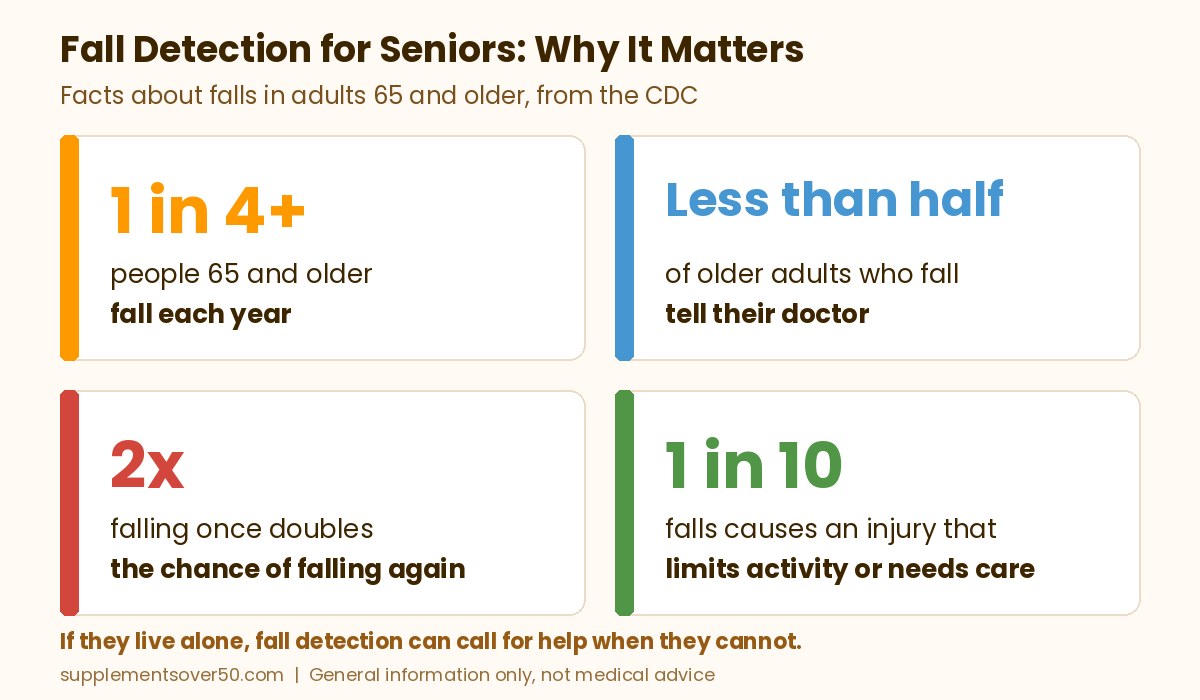
Falls are common, and they get more common with age. The CDC says more than one out of four people age 65 and older falls each year, but less than half tell their doctor, and falling once doubles the chance of falling again. One out of 10 falls causes an injury that makes the person cut back on activities for a day or more or get medical care.
The National Institute on Aging lists the usual reasons. Eyesight, hearing and reflexes may not be as sharp. Conditions such as diabetes, heart disease, thyroid or nerve problems and foot problems can affect balance. Age-related muscle loss, called sarcopenia, and blood pressure that drops too much when you stand up are both risk factors. Some medicines cause dizziness or confusion, and the more medicines a person takes, the more likely a fall becomes.
NIA’s advice for anyone who falls and cannot get up is to ask someone for help or call 911, and if you are alone, to get comfortable and wait for help to arrive. That only works if help is on the way. NIA suggests keeping a charged cordless or mobile phone with you at all times, arranging daily contact with a family member or friend, and considering an emergency response system that lets you push a button on a necklace or bracelet. It also notes that some smartwatches have this feature. That is the gap fall detection fills: it can call for help when the person cannot.
How Fall Detection Works on Apple Watch
According to Apple’s Fall Detection support page, fall detection is built into Apple Watch SE or later, Apple Watch Series 4 or later, and Apple Watch Ultra or later. Here is what happens after a hard fall:
An alert first. The watch taps the wrist, sounds an alarm and shows an alert. The wearer can call emergency services or tap “I’m OK.”
An automatic call if they do not move. If the watch detects the person has been immobile for about a minute, it starts a 30-second countdown with a louder and louder alert, then calls emergency services.
Location shared. When the call connects, the watch plays a message saying a hard fall was detected and shares the location. Afterward it texts the emergency contacts from the Medical ID with the location.
On by default for 55 and older. Apple says that if the age entered at setup or in the Health app is 55 or older, fall detection turns on automatically. You can also turn it on in the Watch app under Emergency SOS, set to Always on or Only on during workouts.
It needs a connection. The watch must reach a cellular connection, Wi-Fi Calling or a nearby iPhone to place the call, and Wrist Detection must be on.
Apple is clear about the limits: the watch cannot detect all falls, and high-impact activity can sometimes trigger it. If a call goes out by mistake, Apple says not to hang up, but to wait and tell the responder you do not need help.
What to Look for in Fall Detection for Seniors
True automatic fall detection. Check that the device detects a fall on its own. A help button only works if the person can press it.
Who gets the call. Smartwatches call emergency services and text family. Monitored medical alert services send the call to a 24/7 operator. Simple Wi-Fi buttons alert family phones only.
Works without a phone in reach. For a parent who leaves the phone in another room, a cellular watch or a monitored system is safer than a watch that relies on a nearby phone.
Something they will wear. Fall detection only works on the body. Pick a watch or pendant they will keep on all day, including the bathroom if the device allows it.
Battery life and charging. A watch that runs flat overnight protects no one in the morning. Build charging into a daily routine.
Easy setup for family. Emergency contacts, a Medical ID and the right age setting should be set up by someone patient and then tested.
Top Picks for the Best Fall Detection for Seniors
Smartwatches With Automatic Fall Detection
1. Apple Watch SE 3 GPS + Cellular (Best Overall for Living Alone)
For a parent with an iPhone who lives alone, this is the one we would buy. The listing says the SE 3 can detect a hard fall or severe car crash, automatically help connect the wearer with emergency services and notify their emergency contacts. The cellular version matters here: with cellular service, the watch can make and take calls on its own, even without the iPhone. So if Dad falls in the garden and the phone is on the kitchen counter, the watch can still place the call.
Apple’s support page explains the rest: after about a minute without movement, it counts down for 30 seconds, then calls emergency services and texts his emergency contacts with his location. If his age is set to 55 or older, fall detection switches on automatically. The listing quotes all-day, 18-hour battery life and fast charging, with up to 8 hours of battery in 15 minutes. It also tracks sleep and workouts. It has more than 600 ratings with a 4.6 rating, and it is shipped and sold by Amazon. Cellular service needs a carrier plan, so check with the carrier before you buy.
⌚ Best Overall for Living Alone
Apple Watch SE 3 GPS + Cellular 40mm Smartwatch
Detects hard falls, calls emergency services and notifies contacts, calls without an iPhone nearby.
2. Apple Watch SE 3 GPS (Best Value for iPhone Users)
The GPS-only SE 3 has the same fall detection and is the most reviewed watch in this guide, with more than 4,900 ratings and a 4.7 rating. The difference is how it reaches help. The listing says the GPS model works with your iPhone or Wi-Fi to stay connected, and Apple’s support page says fall detection needs a cellular connection, Wi-Fi Calling with an internet connection, or a nearby iPhone.
That makes it a good fit for a parent who keeps the iPhone close or has reliable home Wi-Fi set up for Wi-Fi Calling. If they often leave the phone behind or walk outside alone, step up to the cellular model above. It is shipped and sold by Amazon.
📱 Best Value for iPhone Users
Apple Watch SE 3 GPS 40mm Smartwatch
Same hard fall detection, works through a nearby iPhone or Wi-Fi, 18-hour battery life.
3. Samsung Galaxy Watch9 (Best for Android Phones)
Apple Watch only works with an iPhone, so for a parent with an Android phone, the Galaxy Watch9 is the pick. The listing says it works with Samsung phones and other Android phones through the Galaxy Wearable and Samsung Health apps. Samsung’s support page says all Wear OS Galaxy watches include hard fall detection that can send an SOS and notify emergency contacts, and the Watch9 runs Wear OS.
One important difference from Apple: Samsung says fall detection is not turned on by default. Someone has to open the Galaxy Wearable app, go to Safety and emergency, switch on Hard fall detection, add emergency contacts and choose when it should detect falls (Always, During physical activity or Only during workouts). For an older adult, choose Always. The listing also highlights sleep tracking and blood pressure checks. This 40mm Bluetooth model pairs with the phone, so keep the phone nearby. It has more than 650 ratings with a 4.6 rating, and it is shipped and sold by Amazon.
🤖 Best for Android Phones
Samsung Galaxy Watch9 40mm Bluetooth Smartwatch
Hard fall detection with SOS to emergency contacts (turn it on in the app), works with Android phones.
4. Daytech Wi-Fi Caregiver Call Button (Best Simple Help Button)
Some parents will not wear a smartwatch, or will not charge one. A help button is the low-tech backup. This kit includes two call buttons, one of them a wrist button, plus a plug-in receiver. When a button is pressed, the receiver sounds a loud alarm and an alert goes to the family app on your phone, which you can share with other relatives. You can pick from 20 ringtones and 5 volume levels so you know which button was pressed.
To be clear, this does not detect falls. The person must press the button, and it alerts family, not 911 or a monitoring center. The listing says phone call and text alerts are an upgrade for times when you are offline. It is a good choice to put by the bed and in the bathroom, alongside a watch. It has more than 1,000 ratings with a 4.3 rating, and it is sold by Daytech and ships from Amazon.
5. Amazon Echo Show 8 (Best for Calling Family by Voice)
The Echo Show 8 cannot detect a fall. What it can do is let a parent call family without touching anything. Amazon’s Alexa calling help page lists phrases like “Call Mom” or “Call my phone,” so a person within earshot of the device can ask Alexa to call a relative hands-free. The 8.7-inch screen also makes video calls easy, with an auto-framing camera, and the listing says live view lets family check in while away.
There is one big limit you must know: Amazon says Alexa Calling does not support calls to emergency numbers such as 911. Treat it as a way to reach family and stay in daily contact, which NIA recommends, not as an emergency device. It has more than 9,000 ratings with a 4.2 rating, a little lower than our other picks, and it is shipped and sold by Amazon.
📞 Best for Calling Family by Voice
Amazon Echo Show 8 (Newest Model), 8.7-inch HD Display
Hands-free calls to family contacts, video calls with auto-framing camera, live view. Cannot call 911.
6. Ring Battery Doorbell 2K (Best for Seeing Who Is at the Door)
A doorbell camera will not notice a fall either, but it helps a parent who lives alone in a different way. With Live View and Two-Way Talk, they can see and speak to whoever is at the door from a phone or an Echo Show, without rushing down the hall to answer it. Family members can get real-time motion alerts on their own phones too, so you know when the caregiver or a delivery arrives.
The newest model records 2K video with up to 6x Enhanced Zoom and has a built-in battery that recharges by USB-C. The listing notes that rewatching past video and AI-powered alerts need a Ring Protect subscription, sold separately. It has more than 8,400 ratings with a 4.2 rating, and it is shipped and sold by Amazon.
🚪 Best for Seeing Who Is at the Door
Ring Battery Doorbell 2K (Newest Model)
2K video, Live View and Two-Way Talk, motion alerts, works with Echo Show. No fall detection.
When people search for fall detection devices that call family, they usually mean one thing: if Mom goes down, will my phone ring? The answer depends on the device, because there are three different call paths after a fall.
Straight to family. The device calls or alerts the people you pick. There is usually no monitoring center, so it only works if someone answers.
911 first, then family. Smartwatches call emergency services and then let emergency contacts know.
A monitoring center. A trained operator answers, talks to the wearer and decides whether to call family, a neighbor or EMS. This is how medical alert services work, and it comes with a monthly fee.
Apple Watch. The Apple Watch SE 3 GPS + Cellular does not phone family first. Apple’s support page says that after a hard fall with no response, the watch calls emergency services, and when that call ends it sends a message with the location to the emergency contacts saved in the Medical ID. Family hears about it, but by text and after 911. The Apple Watch SE 3 GPS follows the same steps when the iPhone is in range.
Galaxy Watch. Samsung’s emergency settings let you pick which emergency number the watch calls after a hard fall and turn on info sharing with your emergency contacts. That gives you a bit more control over the call path on the Samsung Galaxy Watch9, so go through those settings with your parent during setup.
App-based help buttons. The Daytech Wi-Fi caregiver call button goes straight to family: a press sounds the receiver and pushes an alert to the family app. It does not sense falls, so treat it as a press-for-help backup, not a fall detection bracelet.
GPS pendants that call family. The SecuLife Medical Alert Pendant is the closest thing on Amazon to a true family-calling fall detector. Its listing says it detects falls automatically, then calls and sends an SOS to the contacts you choose. It also offers two-way calling, GPS tracking with safe zones and up to 6 days of battery, with no call center involved. The listing says a subscription of about $20 a month is required, so check current pricing. Reviews are mixed (3.9 out of 5 from about 330 ratings when we checked), so read the recent ones first.
📞 Best Pendant That Calls Family
SecuLife Medical Alert Pendant with Fall Detection and GPS
Automatic fall detection that calls and alerts your chosen contacts, two-way calling, GPS safe zones. No call center; subscription required.
Is calling family directly the right setup? Weigh it honestly:
Pros: the people who know your parent respond, monitoring fees are low or zero, and a fall detection wearable device like a watch doubles as a phone.
Cons: if family misses the call at 3 a.m., nobody else steps in, relatives may live an hour away, and no device catches every fall.
For a parent who lives alone far from relatives, make 911 or a monitoring center the main layer and add family alerts on top.
Medical Alert Systems With Fall Detection
If your parent will not wear a smartwatch or charge it every day, the best medical alert systems with fall detection pair a pendant or mobile button with a 24/7 monitoring center. Fall detection is almost always an add-on with its own monthly fee, and the advertised base price is only part of what you sign up for. The table below sums up what each brand’s own site and terms showed when we checked. Prices change often, so treat these as approximate and check current pricing before you order.
Service
Fall detection add-on
Monitoring starts around
Terms to know
Bay Alarm Medical
About $10 a month extra; in-home fall button carries a one-time device fee of about $30
About $27.95 a month (SOS Home Landline)
Mobile units and the Smartwatch require a device purchase (list about $149 to $199, often discounted); in-home consoles are leased; cancel by phone
LifeFone
About $5 a month extra
About $24.95 a month (At-Home Landline, annual plan)
Says you can cancel any time and pay only for the time used; spouse covered free on At-Home basic service
MedicalAlert
About $10 a month extra
About $29.95 a month
Free lockbox on annual plans; prices vary by system and add-ons
Medical Guardian
About $10 a month extra on home systems
About $27.95 a month
Terms set a 3-month minimum, cancellation by phone or mail, a device purchase of about $149.95 to $199.95 on most systems and a $0.99 monthly account fee
ADT Health
About $11 a month extra
About $37.99 a month on quarterly or annual billing ($39.99 month to month)
Activation fee of about $99 (waived in its current promo); month to month with no termination fees; fall detection only on Medical Alert Plus and On-The-Go
Do these services call family? Yes, through an operator. When the pendant senses a fall, it connects to the monitoring center and an agent speaks to the wearer through the device. ADT says that if there is no answer, the agent follows the instructions on file, which can mean calling contacts, first responders or both. Medical Guardian says its center can send EMS or someone you trust, such as a neighbor or family member. Bay Alarm also offers a caregiver app that shows the wearer’s location and battery status.
No fall detection is perfect. ADT and MedicalAlert both state that fall detection does not detect 100% of falls. Medical Guardian notes that dropping a device can set off a false alarm. Bay Alarm says no automatic fall detection is 100% accurate and that it should not be relied on for people with memory loss or seizures, or for anyone who refuses to press the button. Every one of these brands says the same thing in the end: press the button whenever you can.
Best for a low fall detection add-on
LifeFone Medical Alert
At-home and on-the-go systems with optional automatic fall detection, a spouse covered free on At-Home basic service, and cancellation any time.
The trade-off versus a smartwatch is simple: you pay a monthly fee for a live operator and a device that is built for one job. A watch has no monitoring fee for fall detection, but it calls 911 and texts family rather than a dedicated operator, and it needs charging every day.
How to Choose Fall Detection for Seniors
If they have an iPhone and live alone, pick the Apple Watch SE 3 GPS + Cellular.
If they have an iPhone and keep it close, the Apple Watch SE 3 GPS saves money with the same fall detection.
If they use an Android phone, pick the Galaxy Watch9 and turn on Hard fall detection in the app.
If they will not wear or charge a watch, look at a monitored medical alert service with a fall detection pendant.
If they just want an easy way to call family, add the Daytech help button or an Echo Show 8, knowing neither one detects falls.
If answering the door is a worry, add the Ring Battery Doorbell 2K.
Monitoring and service fees. Smartwatch fall detection has no monitoring fee, but a cellular watch needs a carrier plan. Medical alert services charge a monthly fee. The Daytech button’s phone and text alerts are an upgrade, and Ring video history needs Ring Protect.
Range. A Bluetooth watch needs the phone nearby, and a Wi-Fi button only works where the home Wi-Fi reaches. Walk the house and yard with the device and check the signal in the bathroom and garage.
Battery. The Apple Watch SE 3 is rated for 18 hours, so it needs charging every day. A good routine is charging during morning coffee and wearing it all night. Check the battery on buttons and pendants too.
Set the right age and contacts. On Apple Watch, make sure the correct age is in the Medical ID and Health profile so fall detection turns on, and add emergency contacts. On Galaxy Watch, add contacts before turning on Hard fall detection.
Test it. Press the help button and confirm every family phone gets the alert. Do not stage a fall to test a watch. Instead, check the settings are on and learn what to do if the watch calls by mistake: stay on the line and tell the responder you are fine.
Keep a daily check-in. NIA recommends daily contact with family or a friend. A quick call each morning catches problems a device can miss.
What is the best fall detection for seniors living alone?
For an iPhone user, the Apple Watch SE 3 GPS + Cellular is our top pick because it can detect a hard fall and call emergency services by itself, even without the iPhone nearby. For Android users, the Galaxy Watch9 is a good option. People who will not wear a watch may prefer a monitored medical alert pendant.
Does Apple Watch fall detection turn on automatically?
Apple says that if you entered your age at setup or in the Health app and you are 55 or older, fall detection turns on automatically. Anyone can turn it on in the Watch app on the iPhone under Emergency SOS. Make sure the age in the Medical ID and Health profile is correct.
Can Alexa call 911 if my mom falls?
No. Amazon says Alexa Calling does not support calls to emergency numbers such as 911. An Echo Show 8 can call family contacts by voice, which is useful for staying in touch, but it does not detect falls and should not be the only safety plan.
Do fall detection watches work without a phone?
It depends on the model. Apple says fall detection needs a cellular connection, Wi-Fi Calling or a nearby iPhone. A GPS + Cellular Apple Watch with a carrier plan can call on its own. Bluetooth-only watches need the phone within range.
Is fall detection 100 percent reliable?
No. Apple says its watch cannot detect all falls and that high-impact activity can sometimes be mistaken for a fall. That is why a help button they can press, and a daily check-in with family, are smart backups.
What should my parent do after a fall if no one is home?
NIA says to breathe, stay still for a moment, and decide whether you are hurt before trying to get up. If you can get up safely, roll to your side and crawl to a sturdy chair. If you are hurt or cannot get up, call for help, and if alone, get comfortable and wait for help to arrive.
Is there a fall detection device that calls family?
Yes. Some GPS pendants, such as the SecuLife pendant, detect a fall and call or alert the contacts you choose, with no call center (a monthly subscription is required). Apple Watch calls emergency services first and then texts your emergency contacts with your location. Galaxy Watch lets you choose the emergency number it calls and share info with emergency contacts. Monitored medical alert services can also call family through their operators.
Which medical alert systems have fall detection?
Bay Alarm Medical, LifeFone, MedicalAlert, Medical Guardian and ADT Health all offer automatic fall detection, usually as a monthly add-on of about $5 to $11 on top of the base plan when we checked. Check current pricing and read each brand’s terms for device fees, minimum commitments and cancellation rules. No system detects every fall, so the wearer should still press the button when they can.
Our Take
The best fall detection for seniors is a device that can call for help when the person cannot. For a parent with an iPhone who lives alone, the Apple Watch SE 3 GPS + Cellular is our top pick: it detects hard falls, calls emergency services after a short countdown and texts family with the location. The GPS model is the money saver if the phone stays close, and the Galaxy Watch9 covers Android users once fall detection is switched on. If a watch is not realistic, look at a monitored service like Medical Guardian or Bay Alarm Medical. A help button, an Echo Show 8 and a Ring doorbell are useful extras, but none of them detects a fall. Whatever you choose, set it up together, test it and keep a daily check-in.
This article is for general information only and is not medical advice. Fall detection devices cannot detect every fall and do not replace medical care or a fall risk check with a doctor. If someone is hurt after a fall, call 911.
Learn how to read a supplement label after 50: serving size, mcg vs IU, %DV, the best nutrient forms, upper limits, proprietary blends and what USP and NSF seals mean.
Which supplements to lower blood pressure have real evidence after 50? Garlic, magnesium and beetroot nitrate compared, plus DASH, drug interactions and safety.