This guide contains affiliate links. If you buy through them, we may earn a small commission at no extra cost to you.
⚡ Quick Answer
Our top pick for iPhone users is the Apple Watch SE 3: the highest-rated tracker we checked, with a nightly sleep score, sleep apnea notifications and fall detection on your wrist. The rest of our picks: Fitbit Charge 6 (best band with a screen), Oura Ring 4 (best ring, no screen), RingConn Gen 2 Air (best ring without a required subscription) and Fitbit Inspire 3 (best simple, budget-friendly band). Want a calmer bedtime routine instead of data? The Hatch Restore 3 is a sunrise alarm and sound machine, not a tracker.
A good sleep tracker for seniors answers the question you ask every morning: did I actually sleep, or did it just feel like I was awake all night? After 50, sleep gets lighter and more broken for a lot of people, and a tracker can show you the pattern behind those tired mornings. It will not fix your sleep on its own, but it gives you real numbers to work with and to bring to your doctor.
This guide covers devices only. We compared five sleep trackers you wear on your wrist or finger, plus one bedside sunrise clock, on the things that matter after 50: comfort in bed, a screen (or no screen) you are happy with, battery life, subscriptions and what each one can and cannot tell you. Product details come from the Amazon listings and the brands’ own pages, and the background on how sleep changes with age comes from the National Institute on Aging.
Table of Contents
Sleep Tracker for Seniors: Quick Comparison
Tracker
Best for
How you wear it
Sleep features (per listing)
Apple Watch SE 3
Best overall for iPhone users
Watch
Sleep score, sleep apnea notifications, fall detection
Fitbit Charge 6
Best band with a screen
Band with screen
Nightly Sleep Score, Smart Wake alarm
Oura Ring 4
Best ring, no screen
Smart ring
Sleep plus 50+ health metrics; up to 8 days battery
RingConn Gen 2 Air
Ring without a required subscription
Smart ring
Sleep, heart rate, blood oxygen; up to 10 days battery
Fitbit Inspire 3
Simple, budget-friendly band
Slim band with screen
Automatic sleep tracking, Sleep Score, smart wake alarm
Hatch Restore 3
Bedtime routine (not a tracker)
Bedside clock
Sleep sounds, sunrise alarm; does not track sleep
Why Sleep Changes After 50
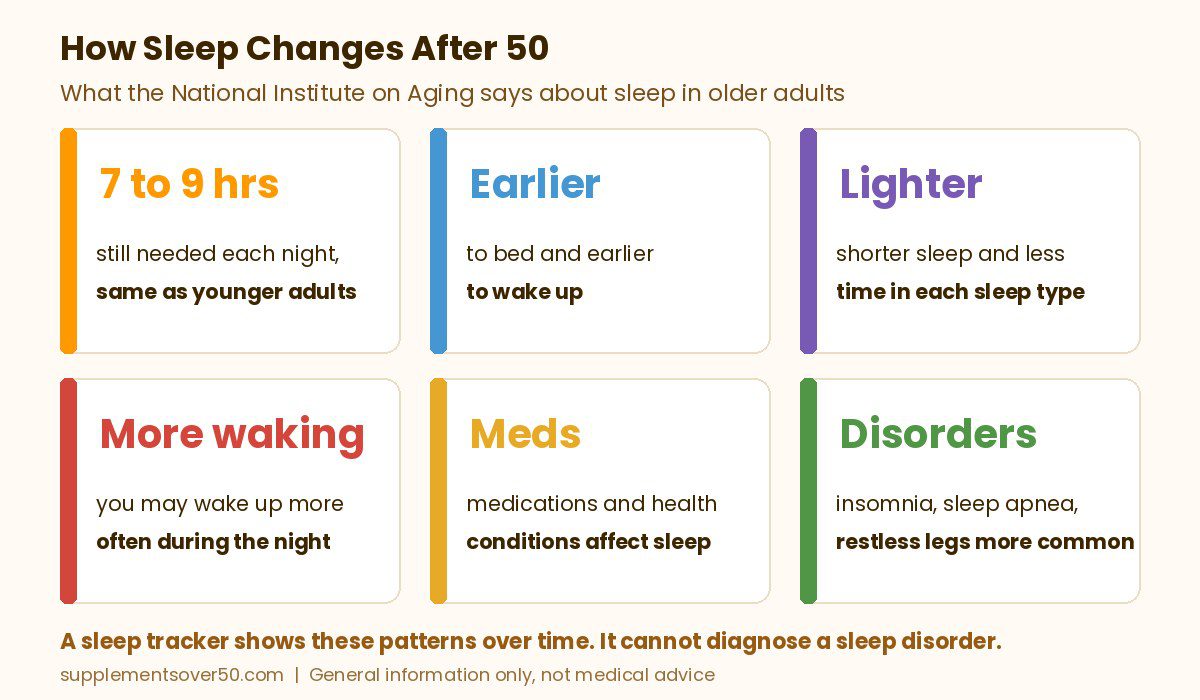
According to the National Institute on Aging, older adults need about the same amount of sleep as younger adults: seven to nine hours a night. What changes is how that sleep looks. Older people tend to go to bed earlier and wake up earlier, and the time spent in each type of sleep goes down. Sleep tends to be shorter and lighter, and you may wake up more often during the night.
NIA also points out that older adults are more likely to take medications and have medical conditions that affect sleep, and that sleep disorders become more common with age, including insomnia, sleep apnea and restless legs syndrome. Insomnia is the most common sleep problem in adults 60 and older. Poor sleep is more than an annoyance: NIA links it to memory problems, low mood and a higher risk of falls or accidents.
NIA suggests that if you have trouble sleeping, you keep a sleep diary for a couple of weeks: when you go to bed, when you wake during the night, when you get up, and whether you had caffeine, alcohol or exercise that day. That diary helps you and your doctor spot patterns. A sleep tracker does a lot of that logging for you automatically, every night, so you can see trends over weeks instead of guessing.
What a Sleep Tracker Can and Cannot Tell You
Wrist and ring trackers estimate your sleep from movement, heart rate and other sensor data. They are good at showing trends: when you fell asleep, how often you woke, how long you slept and whether a new routine is helping. They are not the same as a sleep study. When a doctor needs to diagnose a sleep disorder, NIA says they may suggest a polysomnogram, an overnight test at a sleep center that records brain activity, eye movements and muscle activity.
The Apple Watch SE 3 is the only pick here whose listing mentions sleep apnea notifications. Apple’s support page says the feature looks for breathing disturbances over a 30-day period and can notify you if they show consistent signs of moderate to severe sleep apnea. Apple is also clear that the feature is not intended to diagnose sleep apnea, that not everyone with sleep apnea will get a notification, and that you should talk to your doctor if you think you have it. None of the trackers in this guide can diagnose sleep apnea. If you snore loudly, stop breathing in your sleep or feel exhausted every day, see your doctor whatever your tracker says.
What to Look for in a Sleep Tracker for Seniors
Comfort in bed. You only get data if you wear it. A slim band or a ring is easier to forget about at night than a bulky watch.
Battery life. A tracker that needs charging every day can miss nights. Rings in this guide list up to 8 to 10 days; the Apple Watch SE 3 lists 18 hours, so plan a daily top-up.
A screen, or no screen. A screen shows the time and your score at a glance. A ring has no screen, so everything lives in the phone app.
Subscriptions. Some trackers lock extra features behind a monthly membership. Check what you get for free before you buy.
Your phone. The Apple Watch SE 3 needs an iPhone. The Fitbit Inspire 3 listing names both iPhone and Android, so check each listing against the phone you use.
Sizing. Smart rings use their own sizing. Both ring brands here tell you to use their sizing kit before ordering.
Extras that matter after 50. Fall detection, a gentle vibrating alarm that will not wake your partner, and a clear, easy app are worth more than dozens of fitness modes.
Top Picks for the Best Sleep Tracker for Seniors
1. Apple Watch SE 3 (Best Overall for iPhone Users)
If you already use an iPhone, this is the sleep tracker we would buy first. The listing calls the SE 3 an advanced health tracker: it tracks your sleep score, offers sleep apnea notifications and uses temperature sensing for insights in the Vitals and Cycle Tracking apps. For adults over 50, the safety features are a real bonus. The listing says it can detect a hard fall or a severe car crash, help connect you with emergency services and notify your emergency contacts.
The tradeoff is battery. The listing gives 18 hours of all-day battery life and says it charges up to twice as fast as the SE 2, with up to 8 hours of battery in 15 minutes. A quick charge while you get ready for bed is usually enough to wear it overnight. This is the GPS model, which works with your iPhone or Wi-Fi. It has more than 4,900 ratings with a 4.7 rating, the highest of any tracker we checked, and it is shipped and sold by Amazon.
⭐ Best Overall for iPhone Users
Apple Watch SE 3 GPS 40mm Smartwatch
Sleep score, sleep apnea notifications, temperature sensing, fall detection, fast charging.
The Charge 6 is a slim fitness band with a screen, and it is the pick we would give anyone who does not use an iPhone or does not want a full smartwatch. For sleep, the listing highlights a personalized nightly Sleep Score and a Smart Wake alarm designed to wake you more naturally. During the day it tracks 24/7 heart rate, Daily Readiness, stress with a stress management score, and more than 40 exercise modes with built-in GPS.
Google offers a Google Health Premium membership, sold separately, that adds personalized coaching; the listing mentions a trial at no cost. The Charge 6 has more than 22,000 ratings with a 4.0 rating, and it is shipped and sold by Amazon. Google has a newer band, the Fitbit Edge, but when we checked it had only a few dozen ratings, so the Charge 6 is still the proven choice.
If a band on your wrist keeps you awake, a ring is the easiest tracker to sleep in. The Oura Ring 4 has no screen and no vibrations, and the listing says it tracks more than 50 health metrics, including sleep, activity, stress and heart health, with up to 8 days of battery life. That long battery is a real plus for sleep tracking, because you are not taking it off every night to charge.
Two things to know before you buy. First, Oura uses its own sizing, different from jewelry sizes, and the listing says to use the Oura Ring 4 Sizing Kit first. Second, the first month of Oura membership is included for new members, and after that the membership is a monthly subscription. Oura says the ring is HSA/FSA eligible. It has more than 9,500 ratings with a 4.0 rating, and it is shipped and sold by Amazon.
💍 Best Ring, No Screen
Oura Ring 4 Smart Ring
Sleep plus 50+ health metrics, no screen, up to 8 days of battery. Size with the sizing kit first.
4. RingConn Gen 2 Air (Best Ring Without a Required Subscription)
The RingConn Gen 2 Air is the ring to look at if you do not want another monthly bill. The listing says standard features in the RingConn app are free for life with no subscription fee. It tracks sleep, heart rate, stress, blood oxygen and activity, and the app gives you a personalized report with guidance.
The listing describes a thin 2mm profile that weighs 2.5g, up to 10 days of battery on a full charge, and an IP68 water resistance rating, so you can wear it in the shower. Like Oura, it uses its own sizing, so order the RingConn sizing kit first. It has more than 4,900 ratings with a 4.2 rating, and it is sold by the RingConn Official Store and ships from Amazon.
💤 Best Ring Without a Required Subscription
RingConn Gen 2 Air Smart Ring
No subscription for standard features, up to 10 days of battery, 2.5g, sleep and blood oxygen tracking.
For a parent who wants something simple, the Inspire 3 is the easiest tracker in this guide. It is a slim band with a small screen, and the listing lists automatic sleep tracking, a detailed daily Sleep Score, a smart wake vibrating alarm and a sleep mode. A vibrating alarm on your wrist is a kind way to wake up without disturbing a partner.
It also covers the health basics many people over 50 want: 24/7 heart rate, resting heart rate, SpO2, irregular heart rhythm notifications and reminders to move. The listing says it works with iPhone on iOS 16.4 or later and Android 11 or later. It is the most reviewed pick here, with more than 28,000 ratings and a 4.2 rating, and it is shipped and sold by Amazon.
💰 Best Simple, Budget-Friendly Band
Google Fitbit Inspire 3 Health and Fitness Tracker
Bonus: Hatch Restore 3 (Best for a Calmer Bedtime, Not a Tracker)
The Hatch Restore 3 was on our starting shortlist, and it is a great bedside device, but it does not track your sleep. Its listing describes a bedtime routine helper instead: customizable light and audio pairings to wind down, more than 80 sleep sounds, a dimmable clock that keeps the room dark and a sunrise alarm clock for a gentler wake-up. If your tracker shows you are struggling to fall asleep, this pairs nicely with NIA’s advice to have a relaxing bedtime routine.
The purchase includes a 30-day free trial of Hatch+ premium content for new subscribers, and after that Hatch+ is a paid subscription you can cancel anytime. It has more than 3,400 ratings with a 4.2 rating, and it is sold by Hatch Baby and ships from Amazon. Hatch also sells a newer Hatch Sleep Clock that does track sleep from your nightstand, but when we checked it was only offered on Amazon by a third-party seller, so we did not include it.
🌅 Best for a Calmer Bedtime (Not a Tracker)
Hatch Restore 3 Sunrise Alarm Clock and Sound Machine
Sleep sounds, wind-down light and audio, dimmable clock and sunrise alarm. Does not track sleep.
Why the Withings Sleep Analyzer Is Not on This List
A tracker you slide under the mattress sounds ideal for anyone who hates wearing things to bed. In the US, though, the Withings sleep analyzer page sends you to a product called Withings Sleep, an under-mattress pad that the listing says analyzes sleep cycles, detects snoring and monitors heart rate. When we checked, its Amazon rating was 3.8, lower than every pick above, so we left it out. Withings also offers an optional Withings+ subscription with it.
How to Choose the Best Sleep Tracker for Seniors
If you use an iPhone and want sleep plus safety features, pick the Apple Watch SE 3.
If you do not use an iPhone, or want a slim band with a screen and built-in GPS, pick the Fitbit Charge 6.
If anything on your wrist bothers you in bed, pick a ring: the Oura Ring 4 for the most detailed app, or the RingConn Gen 2 Air to skip a required subscription.
If you are buying for a parent who wants it simple, pick the Fitbit Inspire 3.
If your problem is winding down rather than measuring, add the Hatch Restore 3 to your bedside.
Wear it every night for a few weeks. One bad night means little. Look at the weekly trend.
Keep a simple note. NIA suggests tracking caffeine, alcohol and exercise along with your sleep. Most tracker apps let you add notes or tags.
Keep a regular schedule. NIA recommends going to bed and getting up at the same time each day, even on weekends.
Charge at the same time each day. Top up during your shower or morning coffee so the battery is ready for bedtime.
Do not chase a perfect score. If worrying about the number keeps you up, check the app once a week instead of every morning.
Before You Buy: When to See a Doctor
A sleep tracker is a wellness tool, not a medical test. NIA says to talk with your doctor if you are always sleepy or find it hard to get enough sleep at night. Talk to your doctor too if you or your partner notice loud snoring or pauses in breathing, because NIA warns that undiagnosed or untreated sleep apnea can lead to serious health problems. Restless legs, kicking during sleep and acting out dreams are other signs worth raising. NIA also advises talking with your doctor before starting medication or supplements to improve your sleep. Bring a few weeks of tracker data or a sleep diary with you; it makes the conversation much easier.
For iPhone users, we like the Apple Watch SE 3: it has the highest rating of the trackers we checked and adds a sleep score, sleep apnea notifications and fall detection. If you do not use an iPhone, the Fitbit Charge 6 is a good choice. If a wrist device bothers you in bed, try the Oura Ring 4 or RingConn Gen 2 Air.
Can a sleep tracker diagnose sleep apnea?
No. Some trackers, like the Apple Watch SE 3, can notify you of possible signs of sleep apnea, but Apple says its feature is not intended to diagnose it and not everyone with sleep apnea gets a notification. Diagnosis needs a doctor, who may order an overnight sleep study.
Is a smart ring or a wrist tracker better for sleep?
A ring is often more comfortable to sleep in and has no screen to light up at night. The rings in this guide also list longer battery life. A wrist band or watch shows the time and your stats at a glance and can add features like fall detection on the Apple Watch.
Do sleep trackers need a subscription?
Some do for extra features. Oura includes the first month of membership and then charges monthly. Fitbit offers an optional Google Health Premium membership, and RingConn says standard features need no subscription. Apple’s sleep apnea notifications are set up in the Health app on your iPhone.
How much sleep do adults over 50 need?
The National Institute on Aging says older adults need about the same amount of sleep as all adults, seven to nine hours each night. Sleep tends to get shorter and lighter with age, which is one reason a tracker can help you see what is really happening.
Is a sunrise alarm clock the same as a sleep tracker?
No. A sunrise alarm like the Hatch Restore 3 helps with your bedtime routine and wake-up using light and sound, but it does not track your sleep. You can use one alongside a wearable tracker.
Our Take
The best sleep tracker for seniors is the one you will actually wear to bed every night. For iPhone users over 50, the Apple Watch SE 3 is our top pick: it is the highest-rated tracker we checked and adds safety features like fall detection. If you do not use an iPhone, look at the Fitbit Charge 6, and anyone who hates sleeping with a band should try a ring. Use the data to spot patterns, not to diagnose yourself, and take it to your doctor if your sleep is not getting better.
This article is for general information only and is not medical advice. Sleep trackers are not medical devices for diagnosing sleep disorders. If you have ongoing trouble sleeping, loud snoring or daytime sleepiness, talk to your healthcare professional.
The best medical alert systems for seniors compared: Bay Alarm Medical, Medical Guardian, LifeFone, MedicalAlert and 2 Amazon options, with fall detection and contract terms.
Medical alert systems for seniors with no monthly fee: 5 smartwatch, autodial and pager picks, what you give up without monitoring, and when to pay for 24/7 help.
The best OTC hearing aids for seniors by budget and hearing need: self-fitting, Bluetooth, discreet and budget picks, plus FDA guidance on who OTC aids suit.
Our Philips Lifeline review explains the name change to Lifeline, current devices, fees, contract terms and customer reviews, plus three better alternatives.