This guide contains affiliate links. If you buy through them, we may earn a small commission at no extra cost to you.
We have not tested these devices ourselves. This guide compiles each brand’s published specs and plan terms, CDC falls data, and patterns in verified buyer reviews.
⚡ Quick Answer
Philips Lifeline is now simply Lifeline. Philips sold it to Connect America, and the service runs today from lifeline.com with four devices: HomeSafe (at home), On the Go and On the Go Mini (GPS pendants) and a Smartwatch. Its strengths are a long track record, its own North American response centers and wide health plan partnerships. The catches are add-on fees, a three-month minimum charge and billing that keeps running until equipment is returned. If you want simpler terms, look at Bay Alarm Medical (best value), Medical Guardian (longest mobile battery) or LifeFone (cheapest fall detection and a 30-day guarantee).
If you are searching for Philips Lifeline, you are probably either shopping for a medical alert for a parent or trying to reach the company about an existing account. Either way, the first thing to know is that the name has changed. The service you remember from TV ads and hospital referrals still exists, but Philips no longer runs it, and it now sells under the plain name Lifeline.
This review explains who owns Lifeline now, what the current devices do, what it really costs once setup, fall detection and other add-ons are included, how the contract and cancellation terms work, and what customers say on Trustpilot and the BBB. Then we compare it with three alternatives that are easier to price out. Facts come from lifeline.com, its subscriber terms and the review pages we opened at the time of writing.
Table of Contents
What Happened to Philips Lifeline?
Lifeline is the original personal emergency response service in North America. According to Lifeline’s own history page, gerontologist Andrew Dibner and his wife Susan founded Lifeline Systems in the mid-1970s, and the company introduced automatic fall detection more than 15 years ago. Philips owned the business for years, which is why so many people still know it as Philips Lifeline.
That changed when Connect America acquired Lifeline, with Philips keeping an equity stake, per the same page. Connect America is a Pennsylvania-based connected health company that now lists Lifeline alongside its MedicalAlert and 100Plus brands. In plain terms: same service, new owner, shorter name. Your old Philips Lifeline account, if you have one, is handled by Lifeline customer care.
Current name: Lifeline (lifeline.com), run by Lifeline Systems Company, based in Marlborough, Massachusetts.
Parent company: Connect America, with Philips holding an equity stake, according to Lifeline.
Size: Lifeline says it has served more than 7.5 million people and has more subscribers than any other US medical alert provider. That is the company’s claim, based on subscriber count.
Customer care: Lifeline lists 1-800-635-6156 for existing customers and cancellations; sales numbers on the site vary by page.
Old device names: Philips-era devices are no longer listed. The current line is HomeSafe, On the Go, On the Go Mini and the Lifeline Smartwatch, plus a separate medication dispenser service.
Why a Medical Alert Matters After 50
Falls are the main reason families look at Lifeline in the first place. According to the CDC’s Facts About Older Adult Falls, more than one in four adults 65 and older falls each year, yet less than half tell their doctor. Falling once doubles the chance of falling again, and older adult falls lead to about 4.5 million emergency department visits a year.
A medical alert does not stop a fall. What it does is shorten the gap between a fall and help arriving, which matters most for anyone living alone. With a monitored service like Lifeline, pressing the button connects to a trained operator who can call 911, a neighbor or family, and optional fall detection can start that call automatically if the wearer cannot press the button.
Philips Lifeline Devices Today
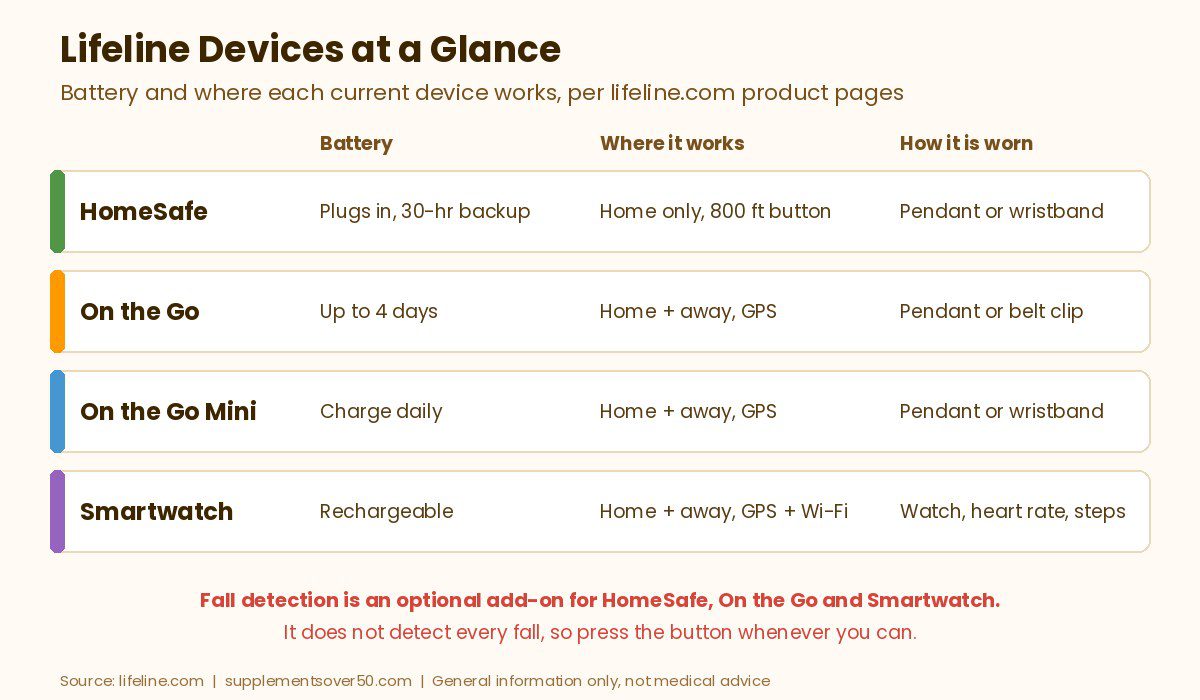
Here is the current Lifeline lineup. Monthly figures are the starting rates listed on each product page at the time of writing, and Lifeline says those are based on an annual plan. Check current pricing before you order, because promotions change often.
Device
Best for
Where it works
Battery
Starting cost
HomeSafe (cellular)
Seniors who mostly stay home
Home only, button range up to 800 ft
Plugs in, 30-hour backup; button battery replaced by Lifeline
About $34.95/mo (annual plan)
On the Go
Active seniors who go out
Home and away, GPS + cellular
Up to 4 days (charging daily recommended)
About $39.95/mo (annual plan)
On the Go Mini
A smaller pendant or a wristband
Home and away, GPS + cellular
Rechargeable; charging daily recommended
About $44.95/mo (annual plan)
Lifeline Smartwatch
People who prefer a watch
Home and away, GPS + Wi-Fi
Rechargeable
About $34.95/mo (annual plan) plus a device fee
HomeSafe: The In-Home System
HomeSafe is the classic Lifeline setup: an in-home communicator that works like a speakerphone, plus a waterproof help button worn as a pendant or a wristband. It runs on a cellular network, so no landline is needed, the button reaches up to 800 feet from the communicator, and the communicator has a 30-hour backup battery for power outages. Lifeline says the help button battery is long-lasting and that it replaces the button automatically when needed, so there is nothing to charge.
This is the right Lifeline device for someone who spends most of the day at home. It does not have GPS, so it will not help on a walk or at the store. The button range is a little shorter than some rivals (Bay Alarm lists up to 1,000 feet for its home system), so test it in the garden and the farthest bedroom.
On the Go and On the Go Mini: GPS Pendants
On the Go is an all-in-one pendant with a speaker, microphone, GPS and its own cellular connection, so it works at home and away. Lifeline says the latest version is smaller and lighter, waterproof for the shower, and lasts up to four days per charge, though it recommends charging daily. It can be worn around the neck or clipped to a belt.
The On the Go Mini has the same features in a smaller, lighter body, and it is the device behind most searches for a Philips Lifeline wristband: you can choose a pendant or a wristband style. It starts about $5 a month higher than the standard model. Lifeline does not list a battery figure for the Mini, only that it should be charged daily.
Lifeline Smartwatch
The Lifeline Smartwatch puts a dedicated help button on the wrist, with GPS and Wi-Fi location, two-way voice, voice prompts that announce calls and low battery, a heart rate monitor and step tracking. It is waterproof for the shower. Lifeline does not publish a battery life figure on the product page, and its Humana member page mentions a device fee on smartwatch systems, so ask for the full up-front cost when you order.
A watch suits people who will not wear a pendant. The trade-off with any medical alert watch is charging: if it sits on the charger, it is not on the wrist. If a watch is the priority, our guide to the best fall detection devices for seniors living alone compares several watch-style options.
Fall Detection (Formerly AutoAlert)
Lifeline’s fall detection, which the site still refers to as AutoAlert in its fine print, is optional on HomeSafe, On the Go and the Smartwatch. Lifeline says the button uses accelerometers to sense a sudden force and barometric sensors to detect a change in height, then an algorithm decides whether it was a real fall. If a fall is detected, a care specialist calls out through the device, and if they cannot reach the wearer, they may send emergency services.
At the time of writing, fall detection cost about $15 a month extra. That is more than many competitors: Bay Alarm lists about $10 and LifeFone about $5. Lifeline is clear that fall detection does not catch 100% of falls and that users should always press the button if they can.
Philips Lifeline Cost: Fees, Add-Ons and Discounts
The monthly rate is only part of the bill. Here is what else we found on lifeline.com and in its subscriber terms and conditions at the time of writing:
Setup fee: the site’s fine print says the setup fee includes a $50 activation fee and a $49.95 programming fee. The programming fee is non-refundable under the terms.
Fall detection: about $15 a month extra.
Key lockbox: about $2.95 a month, or free with annual plans during the promotion we saw.
Protection Plan: about $6.95 a month (Basic, one replacement of the main system per year) or $9.95 a month (Premium, unlimited replacements), per the plan terms.
CareCompass nurse line: an optional add-on at about $15 a month that connects you to a licensed nurse for advice on symptoms or medications.
Professional installation: available in select ZIP codes. The site was advertising free home setup on new plans (described as a $99 value) when we checked.
Billing options: annual (free shipping and lockbox), semi-annual (free shipping) or monthly. Starting prices quoted on product pages assume an annual plan.
Discounts: AARP members were offered 15% off monthly service plus free shipping and free activation, and Lifeline’s Humana member page advertised 30% off monthly service with no upfront fees.
Add it up and a HomeSafe with fall detection on an annual plan works out to roughly $50 a month before the setup fee and any other add-ons, compared with about $45 for Bay Alarm’s cellular home system with fall detection. Always ask for the total due today and the regular monthly rate after any promotion ends, because Lifeline’s fine print says promotional pricing applies only to the first billing cycle.
THE ORIGINAL MEDICAL ALERT BRAND
Lifeline (formerly Philips Lifeline)
In-home HomeSafe, On the Go GPS pendants (including a wristband option) and a Smartwatch, with optional fall detection, the My Lifeline caregiver app and its own North American response centers, per the brand.
Lifeline advertises no long-term contracts and no cancellation fee, and its FAQ says you can cancel any time. The subscriber terms add important detail that is easy to miss:
Three-month minimum: the terms say there is a three-month minimum, non-refundable monitoring charge paid at the time of order. Cancel inside that window and you get back only unused prepaid months beyond the minimum.
Restocking fee: a $35 non-refundable restocking fee applies when you cancel early, along with the programming fee and shipping charges.
Billing runs until equipment is back: the terms say monthly charges continue until Lifeline receives the returned equipment. Equipment must be returned within 30 days of cancelling, or Lifeline may charge a lost unit fee of up to $400.
Short guarantee: the 14-day money-back guarantee in the terms applies only to equipment you bought outright, and it excludes activation, programming, shipping and the three-month minimum.
Auto-renewal and arbitration: service renews month to month until either side cancels in writing, and the terms include a mandatory arbitration clause.
How to cancel: call customer care at 1-800-635-6156, then ship the equipment back with tracking. Some states give extra cancellation rights, which the terms say Lifeline honors.
None of this is hidden, but it is stricter than the 15-day or 30-day refund windows several competitors advertise. If there is any chance your parent will move into assisted living or a hospital stay soon, factor in the three-month minimum before signing up.
Response Center and Caregiver App
Lifeline says it owns and operates its response centers in the US and Canada rather than outsourcing them, with about 200 care specialists who each get 80 hours of training. It cites an average answer time under 30 seconds, which is the company’s own figure, and says it can reach more than 140 languages through an interpreter service. If you or your responder do not confirm help has arrived within 30 minutes, Lifeline says it calls back to check.
The free My Lifeline app lets caregivers get push notifications of alerts, check battery status, see the location of On the Go users, manage several users on one account and share Care Notes with family. That multi-user setup is genuinely useful when several siblings share caregiving. Lifeline also offers a separate automated medication dispenser service; its support page says the dispenser needs a phone line. If missed doses are the bigger worry, see our picks for the best medication reminder devices for seniors.
A key lockbox lets responders get in without forcing the door. Rather than paying a monthly fee, you can buy one outright. The Puroma Key Lock Box ranks among Amazon’s top sellers (overall sales rank around 200 when we checked) and, per its listing, uses a resettable 4-digit code and can hang on a door knob or mount on a wall. Give the code to Lifeline for your care plan.
BEST FOR RESPONDER ENTRY
Puroma Key Lock Box
Resettable 4-digit combination lockbox that hangs on a door knob or mounts to a wall, weatherproof metal body
Lifeline Medical Alert Reviews: What Customers Say
Here is what we found on the public review pages we opened. Ratings change, so treat this as a snapshot.
Trustpilot:Lifeline’s Trustpilot page showed 3.9 out of 5 from more than 1,280 reviews. The profile is claimed by the company and on a paid Trustpilot plan.
BBB:Lifeline’s BBB profile in Marlborough showed an A+ rating and about two years of BBB accreditation, but 162 complaints in the last 3 years (72 in the last 12 months) and an average customer review score of about 1.1 out of 5 from 56 reviews. BBB notes that reviews do not factor into its letter grade.
What people praise: reviewers often describe fast, calm responses when a parent fell, operators who stayed on the line until help arrived, easy monthly testing and the peace of mind of a name they trust. Many reviewers are long-time subscribers.
Common complaints: the negative Trustpilot reviews and BBB complaints we read cluster around billing and cancellation. Several describe charges that continued after a subscriber passed away or after equipment was returned, slow refunds, and long calls where staff tried to retain the account. Other themes include delays getting replacement pendants, accidental button presses, service outages families were not told about, and a few disputes over how an alarm was handled. One recent reviewer also noted that the first greeting now sounded automated before reaching a person. Lifeline had replied to many of the reviews and complaints we saw. These patterns line up with the strict return-to-stop-billing terms above, so keep tracking numbers and written confirmation of any cancellation.
Philips Lifeline Pros and Cons
Pros
Decades of experience and its own US and Canadian response centers, per the brand
Wristband or pendant options on HomeSafe and On the Go Mini
HomeSafe button never needs charging
Strong caregiver app with multi-user management and Care Notes
Partnerships with health plans and an AARP member discount
Optional nurse line (CareCompass) that few rivals offer
Cons
Higher starting prices than Bay Alarm, Medical Guardian or LifeFone home systems
Setup fee of about $100 and fall detection at about $15 a month
Three-month non-refundable minimum and a $35 restocking fee on early cancellation
Billing continues until equipment is received back
Many recent complaints about billing and refunds on BBB and Trustpilot
Exact pricing for each billing option sits behind the cart or a sales call
Better Alternatives to Philips Lifeline
If Lifeline’s fees or terms give you pause, these three services are easier to price out and offer longer or simpler trial windows. Figures come from each brand’s website at the time of writing; check current pricing.
Bay Alarm Medical: Best Value
Bay Alarm Medical lists in-home plans from about $27.95 a month with a 15-day risk-free trial and no activation fees, and fall detection runs about $10 a month on its current devices. Its home system button reaches up to 1,000 feet, and its mobile lineup includes the SOS All-In-One 2, SOS Micro and an SOS Smartwatch. It is the closest like-for-like swap for a Lifeline HomeSafe at a lower monthly cost.
BEST VALUE ALTERNATIVE
Bay Alarm Medical
In-home and GPS devices, optional fall detection on every current model, no activation fees, a 15-day risk-free trial and two US monitoring centers, per the brand.
Medical Guardian offers home systems from as low as about $27.95 a month and the Guardian Flex mobile device from about $39.95 a month. The Flex can be worn on the wrist, belt or a lanyard and is listed at up to 5 days of battery, a little longer than Lifeline’s On the Go. Fall detection is available as an add-on. It is a good fit if your parent is often out and forgets to charge.
BEST FOR MOBILE BATTERY LIFE
Medical Guardian
Compact GPS devices like the Guardian Flex with up to 5 days of battery and three ways to wear it, plus in-home systems and optional fall detection, per the brand.
LifeFone advertises plans from about $24.95 a month with no activation fees or long-term contracts, a 30-day money-back guarantee and automatic fall detection for about $5 a month more. If fall detection is a must, that is roughly a third of Lifeline’s add-on price, and the 30-day guarantee gives you time to see whether your parent will actually wear the device.
BEST FOR LOW-COST FALL DETECTION
LifeFone
Home and mobile systems with low-cost optional fall detection, no activation fees and a 30-day money-back guarantee, per the brand.
Medicare Advantage: some plans partly or fully cover a medical alert, per NCOA, so check your plan’s extra benefits. Lifeline runs member pages for Humana (a discount on monthly service) and UnitedHealthcare (a discount program), and Connect America lists both among its health plan partners.
Medicaid: Humana’s guide notes that Medicaid may cover personal emergency response services under Home and Community-Based Services programs, which vary by state. NCOA adds that most state programs do not, so ask your state Medicaid office or Area Agency on Aging.
Other routes: NCOA says many long-term care insurance policies offer full or partial coverage, the VA offers medical alert benefits to qualified veterans, and PACE programs may cover them where available.
Lifeline’s own FAQ says whether you qualify for a free or discounted system depends on your health plan. Be wary of unsolicited calls offering a free medical alert; contact your plan directly instead.
How to Choose Between Lifeline and the Alternatives
If your plan or AARP membership makes Lifeline cheaper, it is a solid, established choice; go in knowing the three-month minimum.
If your parent mostly stays home and you want the lowest bill, compare Bay Alarm’s home system with Lifeline HomeSafe.
If they want a wristband rather than a pendant, the Lifeline On the Go Mini wristband or Medical Guardian’s Flex both work.
If fall detection is a must, LifeFone’s add-on costs about a third of Lifeline’s.
If they are often out and forget to charge, Medical Guardian’s Flex lists the longest battery of the group.
If you want a nurse line or multi-user caregiver app, Lifeline’s CareCompass and My Lifeline app are real advantages.
Anyone who may cancel within a few months, such as before a planned move to assisted living, because of the three-month minimum and restocking fee.
Budget shoppers who need fall detection, since the add-on costs more than most rivals.
People who will not wear or charge a device. A button in a drawer does nothing; HomeSafe’s no-charge button is the safer Lifeline choice.
Homes with weak cell coverage, since all current Lifeline systems rely on cellular service. Ask Lifeline to check coverage first.
Anyone expecting fall prevention. A medical alert summons help; strength and balance work, a medication review and removing trip hazards still matter most.
If your parent has already fallen, talk to their doctor about fall risk, and CDC advises that an older adult who falls and hits their head should see a doctor right away.
Frequently Asked Questions
Is Philips Lifeline still in business?
Yes, under the name Lifeline. Connect America acquired Lifeline from Philips, with Philips keeping an equity stake, and the service now runs from lifeline.com with the HomeSafe, On the Go, On the Go Mini and Lifeline Smartwatch devices.
How much does Lifeline cost per month?
At the time of writing, plans started at about $34.95 a month for HomeSafe and the Smartwatch, $39.95 for On the Go and $44.95 for On the Go Mini on annual plans. Fall detection adds about $15 a month, and the site lists a setup fee made up of a $50 activation fee and a $49.95 programming fee. Check current pricing and promotions.
Does Lifeline have a wristband?
Yes. The HomeSafe help button can be worn as a pendant or a wristband, and the On the Go Mini GPS device comes in a pendant or wristband style. The Lifeline Smartwatch is another wrist option.
Is there a contract with Lifeline?
Lifeline advertises no long-term contract and no cancellation fee, but its subscriber terms include a three-month minimum, non-refundable monitoring charge paid at order, a $35 restocking fee on early cancellation, and billing that continues until the equipment is returned.
Does Medicare pay for Lifeline?
Original Medicare does not pay for medical alert systems. Some Medicare Advantage plans offer full or partial coverage or discounts, and Medicaid home and community-based programs may cover them in some states. Check with your plan directly.
What is the Lifeline customer service number?
Lifeline lists 1-800-635-6156 for customer care, billing changes and cancellations. Sales numbers on its website vary by page.
Our Take
Philips Lifeline did not disappear; it became Lifeline under Connect America, and it is still a credible service with real strengths, including its own response centers, a no-charge home button, a useful caregiver app and health plan partnerships. What holds it back is cost and fine print: a setup fee, pricier fall detection, a three-month minimum and billing that runs until equipment is back. If a health plan or AARP discount brings the price down, Lifeline is a reasonable pick. If you are paying full price, Bay Alarm Medical, Medical Guardian or LifeFone will usually cost less and are easier to walk away from.
This article is for general information only and is not medical advice. Medical alert systems do not prevent falls, and fall detection does not detect every fall. Prices and plan terms were taken from each brand’s website at the time of writing and may change. Talk to a doctor about fall risk and call 911 in an emergency.
Home blood pressure monitor picks for adults over 50: upper arm OMRON, iHealth and Alcedo models compared on cuff size, display, memory and accuracy tips.
Our Medical Guardian reviews roundup covers every device, fall detection, monitoring, cost per month, fees, contract and cancellation terms, and alternatives.
Over the counter hearing aids explained: who they are for, OTC vs prescription, self-fitting vs preset, typical costs, where to buy and when to see a doctor.
The best OTC hearing aids for seniors by budget and hearing need: self-fitting, Bluetooth, discreet and budget picks, plus FDA guidance on who OTC aids suit.
The best medical alert systems for seniors compared: Bay Alarm Medical, Medical Guardian, LifeFone, MedicalAlert and 2 Amazon options, with fall detection and contract terms.