This guide contains affiliate links. If you buy through them, we may earn a small commission at no extra cost to you.
We have not tested these devices ourselves. This guide compiles each brand’s published specs and plan terms, CDC falls data, Apple and Samsung support documentation, and patterns in verified buyer reviews.
⚡ Quick Answer
You can get real emergency help with no monthly fee, but someone other than a professional call center has to do the answering. Our picks: Apple Watch SE 3 (GPS) (best overall for iPhone users, with automatic fall detection that can dial 911), Samsung Galaxy Watch8 (best for Android phones), LogicMark Freedom Alert (best for a parent without a smartphone), Daytech Wi-Fi Caregiver Call Button (best for alerts on family phones) and CallToU Caregiver Pager (best budget pick when a caregiver lives in the home). If your parent lives alone and may not be able to speak or reach a phone, a monitored service is still the safer choice.
Searching for medical alert systems for seniors no monthly fee usually means one of two things. Either the quotes for monitored services added up to more than you expected over a year, or your parent simply does not want another bill. Both are fair. The good news is that several devices can call for help without a subscription. The catch is that the help comes from 911 or from family, not from a trained operator who stays on the line, can see the care plan and works through your list of contacts.
This guide to medical alert systems for seniors no monthly fee options is honest about that trade-off. We cover five no-fee options that suit different homes, from smartwatches with automatic fall detection to a simple pager for a caregiver down the hall, and then explain when paying for 24/7 monitoring is worth it.
Table of Contents
Medical Alert Systems for Seniors No Monthly Fee: Quick Comparison
Here is how the five medical alert systems for seniors no monthly fee options compare. Device prices are what Amazon showed at the time of writing and they move often, so check current pricing. None of these require a monitoring subscription.
None for app alerts (phone and text alerts are an optional upgrade)
CallToU Caregiver Pager
Caregiver in the same home
Chime on a plug-in receiver
No
No, home only
None
Why No-Fee Medical Alerts Matter After 50
The case for any alert device starts with falls. According to the CDC’s Facts About Older Adult Falls, more than one in four adults 65 and older falls each year, yet less than half tell their doctor. Falling once doubles the chance of falling again, and older adult falls lead to about 4.5 million emergency department visits a year.
Injuries are common. CDC reports that about 37% of people who fall had an injury that needed medical treatment or limited their activity for at least a day.
Hip fractures are a real risk. Nearly 319,000 older adults are hospitalized for hip fractures each year, and falls caused 88% of hip fracture emergency visits and hospitalizations.
Head injuries need fast attention. CDC says an older person who falls and hits their head should see a doctor right away, especially if they take blood thinners.
Fear of falling makes things worse. People who fall often cut back on activity, get weaker and become more likely to fall again.
Monitored plans run month after month, so the yearly cost is what pushes many families toward a one-time purchase. A device that costs about the same as a few months of monitoring can be a sensible choice, as long as you match it to the person and the home.
What You Give Up Without a Monthly Fee
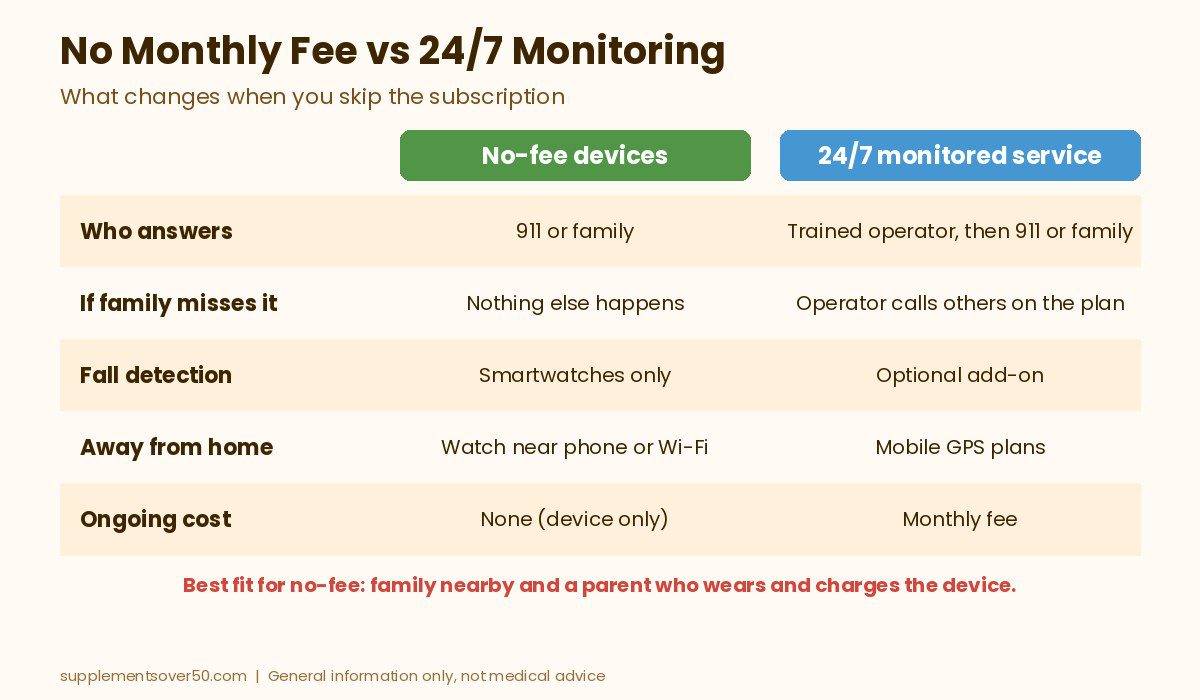
Every option in this guide skips the monitoring center. That is where the savings come from, and it is also the main gap. Here is what changes:
No operator stays on the line. With a monitored service, a trained agent answers, talks to the wearer and calls 911 or the people on the care plan. A no-fee device either dials 911 directly or alerts family, and if family misses the alert, nothing else happens.
Family becomes the call center. App alerts and pager chimes only work if someone sees or hears them. Phones on silent, dead batteries and bad Wi-Fi all break the chain.
Fall detection is limited. Of our picks, only the smartwatches detect falls on their own. Apple says plainly that its watch cannot detect all falls, so the wearer should still call for help when able.
Charging is on you. Smartwatches need charging every day or so. A watch that sits on the charger overnight cannot help with a fall on the way to the bathroom at 3 a.m.
No one manages the setup. You set up emergency contacts, test the device and keep it updated. Monitored brands handle much of this for you.
When you compare medical alert systems for seniors no monthly fee devices against monitoring, remember the person matters most. For a parent who is still independent, wears a watch every day and has family nearby, those trade-offs are often fine. For someone who lives alone, has fallen before or has memory problems, they matter a lot more.
What to Look for in a No-Fee Medical Alert
Who answers. Decide whether the alert should go to 911, to family, or to a caregiver in the home. That single choice narrows the field quickly.
Automatic fall detection. If your parent could be knocked unconscious or unable to move, a device that calls on its own is worth far more than a button.
Phone and connection needs. A GPS-only smartwatch leans on a nearby phone or Wi-Fi. A landline dialer needs an active landline. Wi-Fi buttons need 2.4 GHz home Wi-Fi.
Waterproofing. Bathrooms are a common place to fall, so look for buttons rated for water and a watch your parent can wear in the shower.
Simplicity. One large button beats a menu. If your parent struggles with touchscreens, a dedicated button may be the better fit even without fall detection.
Hidden extras. Some “no fee” products sell paid add-ons, such as text or phone call alerts, or need a cellular plan for full features. Read the listing carefully.
Top Picks: Medical Alert Systems for Seniors No Monthly Fee
Each pick below is based on the Amazon listing and the brand’s own support pages at the time of writing. Ratings are what Amazon showed when we checked and may have changed.
1. Apple Watch SE 3 GPS (Best Overall for iPhone Users)
For a parent who already uses an iPhone, the Apple Watch SE 3 (GPS) is the closest thing to a medical alert with fall detection and no monthly fee. The listing says it can detect a hard fall or severe car crash, help connect the wearer to emergency services and notify emergency contacts. It is also one of the most popular watches on Amazon, with a 4.7 out of 5 rating from 5,000+ reviews when we checked, and it was sold by Amazon. At the time of writing it was listed at about $239 for the 40mm size; check current pricing.
According to Apple’s Fall Detection support page, if the watch senses a hard fall and the wearer stays still for about a minute, it starts a 30-second countdown, then calls emergency services and texts emergency contacts with the location. Fall detection turns on automatically if the wearer’s age is set to 55 or older. The trade-offs: the GPS model needs the iPhone nearby or Wi-Fi Calling to place that call, the listing quotes 18-hour battery life so it needs daily charging, and Apple notes it cannot detect all falls. A GPS + Cellular model can call without the phone, but it needs a carrier plan, which brings back a monthly bill.
BEST OVERALL FOR IPHONE USERS
Apple Watch SE 3 (GPS, 40mm)
Automatic hard fall detection that can call emergency services and alert contacts, with no monitoring fee
2. Samsung Galaxy Watch8 (Best for Android Phones)
If your parent uses an Android phone, the Samsung Galaxy Watch8 is the natural match. Samsung’s support page says all of its Wear OS watches include hard fall detection that sends out an SOS to emergency contacts when a hard fall is detected, so family is notified right away. The listing highlights sleep coaching, health tracking, a lighter design and a 2-year warranty. It held a 4.4 out of 5 rating from 2,100+ reviews when we checked and was sold by Amazon, at about $270 at the time of writing.
Two things to know. This Bluetooth version relies on the paired phone being nearby to send alerts, and Samsung’s fall detection is aimed at notifying your chosen contacts, so it works best when someone reliable is on that list. Samsung’s Wear OS watches are made for Android, not iPhone.
BEST FOR ANDROID PHONES
Samsung Galaxy Watch8 (Bluetooth, 40mm)
Hard fall detection and SOS alerts to emergency contacts, plus health and sleep tracking, with no monitoring fee
3. LogicMark Freedom Alert (Best for Seniors Without a Smartphone)
Not every parent wants a smartwatch. The LogicMark Freedom Alert is a wearable two-way voice pendant that works with your existing landline. Press the button and it connects to 911 dispatchers or to family, and your parent can talk through the pendant itself. The listing states there are no monthly fees, the pendant is rechargeable and it has a 24-hour battery backup. LogicMark’s comparison chart on the listing gives a help button range of about 600 feet from the base. It had a 4.3 out of 5 rating from 500+ reviews when we checked, at about $299 at the time of writing.
The limits are clear. It needs an active landline, it only works at home, and it has no fall detection. It also costs more up front than the other non-watch picks. For an older parent who already has a landline and wants one button that talks directly to 911, though, it is the simplest true no-fee setup on this list.
BEST WITHOUT A SMARTPHONE
LogicMark Freedom Alert (Landline)
Two-way voice pendant that connects to 911 or family through your landline, with no monthly fees
4. Daytech Wi-Fi Caregiver Call Button (Best for Alerts on Family Phones)
The Daytech Wi-Fi Caregiver Call Button bridges the gap between a pager and an app. When your parent presses a button or the wrist button, the plug-in receiver sounds a loud alarm and the app sends a notification to your phone, even if you are across town. You can share alerts with other family members, pick from 20 ringtones and set 5 volume levels. This set includes two buttons, a wrist button and one receiver. It had a 4.3 out of 5 rating from 1,000+ reviews when we checked, at about $60 at the time of writing.
App notifications are free, but the listing says phone call and text message alerts are an upgrade, so plan on relying on the app. The receiver needs home Wi-Fi to forward alerts, and nothing happens if no one looks at their phone. There is no fall detection. It suits families who live nearby and want to know the moment Mom presses the button.
5. CallToU Caregiver Pager (Best Budget Pick for a Caregiver at Home)
If your parent lives with you or a spouse, the CallToU Caregiver Pager is the cheapest way to cover the moments when you are in another room. It is the best seller of the group, with a 4.6 out of 5 rating from 7,300+ reviews when we checked, and it cost about $38 at the time of writing. The listing describes plug-in receivers with a range of 500+ feet in open areas, 55 ringtones, volume adjustable up to 110 dB, and waterproof call buttons that can be worn on a neck strap or mounted on a wall.
It does not call 911, a phone or anyone outside the house, and it has no fall detection. It only works if someone at home hears it. Within those limits, it does one job well, and it pairs nicely with a smartwatch for a parent who is home alone part of the day.
BEST BUDGET IN-HOME PICK
CallToU Caregiver Pager
Waterproof call buttons and plug-in receivers with 500+ ft range and volume up to 110 dB, no monthly fee
A monitored plan makes more sense if your parent lives alone, has fallen before, has a condition that could leave them unable to speak, or does not reliably wear and charge a watch. Two well-known options with no long-term contract:
Bay Alarm Medical lists its SOS Home system from about $27.95 a month at the time of writing, with mobile options from about $34.95 a month and automatic fall detection as an upgrade. The brand says its monitoring centers are in Utah and Idaho and are UL-listed and CSAA Five Diamond certified, and that in-home consoles are leased free of charge but must be returned when you cancel.
BEST VALUE MONITORED PLAN
Bay Alarm Medical
In-home and mobile systems with optional automatic fall detection, 24/7 US-based monitoring and no long-term contract, per the brand.
LifeFone lists its At-Home Landline plan from about $24.95 a month on an annual plan at the time of writing, with a help button range of up to 1,300 feet and a 32-hour backup battery on the base. It lists optional fall detection, a 30-day money-back guarantee, no activation or equipment fees, free coverage for spouses and the ability to cancel anytime. Check current pricing on both sites before you sign up.
BEST FOR LOW-COST LANDLINE MONITORING
LifeFone
At-home and on-the-go plans with optional fall detection, a 30-day money-back guarantee and free spouse coverage, per the brand.
People who live alone with a high fall risk. If no one is reliably available to respond, professional monitoring closes the gap.
People with memory loss. Someone who may forget to charge a watch or what a button does needs a simpler, monitored setup or in-person support.
Homes with weak Wi-Fi or no landline. Wi-Fi buttons and landline dialers fail quietly when the connection is down. Test from every room.
Anyone treating fall detection as foolproof. Apple states its watch cannot detect all falls. Teach your parent to call or press for help whenever they can.
Anyone hoping to prevent falls. These devices summon help; they do not stop falls. CDC lists lower body weakness, balance problems, some medicines, vision problems and home hazards as risk factors that can often be changed.
If your parent has already fallen, talk to their doctor about fall risk. CDC advises that an older person who falls and hits their head should be seen by a doctor right away.
Frequently Asked Questions
Is there a medical alert system with no monthly fee?
Yes. Smartwatches like the Apple Watch SE 3 and Samsung Galaxy Watch8 offer fall detection and SOS calling without a subscription, a landline dialer like the LogicMark Freedom Alert calls 911 or family, and caregiver pagers alert someone in the home. None of them include a professional monitoring center.
What is the best medical alert watch with no monthly fee?
For iPhone users, the Apple Watch SE 3 (GPS) is our top pick because it can detect a hard fall, call emergency services and text emergency contacts. For Android users, the Samsung Galaxy Watch8 includes hard fall detection that sends an SOS to emergency contacts.
Does Apple Watch fall detection need a cellular plan?
No. Per Apple, fall detection can place the call through a nearby iPhone or Wi-Fi Calling. A GPS + Cellular watch can call on its own away from the phone, but it needs a carrier plan, which is a monthly fee.
Can a no-fee alert button call 911?
Some can. The LogicMark Freedom Alert connects to 911 or family through a landline. Wi-Fi call buttons and caregiver pagers usually only alert family or a receiver in the home, so read the listing before you buy.
Are no-fee medical alerts as safe as monitored ones?
Not for everyone. They work well when family can respond quickly, but there is no trained operator answering and contacting help for you. For seniors who live alone or have fallen before, a monitored plan with fall detection is usually safer.
Can my parent wear these in the shower?
The CallToU buttons are listed as waterproof, and many families choose a watch their parent can keep on in the shower. Check each listing’s water rating, and keep plug-in receivers and base stations away from water.
Our Take
Choosing medical alert systems for seniors no monthly fee plans is realistic for many families, as long as you are honest about who will answer. For a parent with an iPhone, the Apple Watch SE 3 is the strongest no-fee choice because it detects hard falls and can call 911 on its own. Android users should look at the Samsung Galaxy Watch8, a parent without a smartphone may be best served by the LogicMark Freedom Alert, and the Daytech and CallToU systems are inexpensive ways to keep family in the loop at home. If your parent lives alone and has fallen before, pay for monitoring. Whatever you choose, set it up together and test it on day one.
This article is for general information only and is not medical advice. No-fee devices do not include professional monitoring, and fall detection does not detect every fall. Device prices and plan terms were taken from Amazon and each brand’s website at the time of writing and may change. Talk to a doctor about fall risk and call 911 in an emergency.
Our Medical Guardian reviews roundup covers every device, fall detection, monitoring, cost per month, fees, contract and cancellation terms, and alternatives.
Jabra Enhance hearing aids reviewed: Select M1, M2 and M3 vs Pro 30 and Plus, OTC vs prescription, remote audiology, trial, warranty, pricing and where to buy.
Over the counter hearing aids explained: who they are for, OTC vs prescription, self-fitting vs preset, typical costs, where to buy and when to see a doctor.
Our Philips Lifeline review explains the name change to Lifeline, current devices, fees, contract terms and customer reviews, plus three better alternatives.