This guide contains affiliate links. If you buy through them, we may earn a small commission at no extra cost to you.
We have not tested these devices ourselves. This guide compiles each brand’s published specs and plan terms, CDC falls data, and patterns in verified buyer reviews.
⚡ Quick Answer
For most families, the best medical alert systems for seniors are monitored services with no long-term contract and optional fall detection. Our picks: Bay Alarm Medical (best overall value, two US monitoring centers), Medical Guardian (best for active seniors who want a small GPS device), LifeFone (best for adding fall detection on a budget), MedicalAlert (best simple no-commitment home system), SecuLife Pendant (best if you want alerts to go straight to family) and CallToU Caregiver Pager (best when a caregiver lives in the same home). If your parent lives alone, choose a monitored plan with fall detection.
Choosing the best medical alert systems for seniors usually starts after a scare: a parent who fell and could not reach the phone, or a call that went unanswered for hours. A medical alert system puts a help button on the wrist or around the neck, so one press connects to a trained operator who can send an ambulance, call a neighbor or ring the family. Some add automatic fall detection that calls for help even if the wearer cannot press the button.
The hard part is that dozens of companies sell what looks like the same thing. Monthly fees, device costs, range, battery life and contract terms all vary, and the marketing does not make comparison easy. Below we compare four well-known monitored services and two Amazon options side by side, using each brand’s own website for features and prices, and explain who each one suits.
Table of Contents
Best Medical Alert Systems for Seniors: Quick Comparison
Prices are the starting monthly rates each brand listed at the time of writing. They change often and promotions are common, so check current pricing before you order.
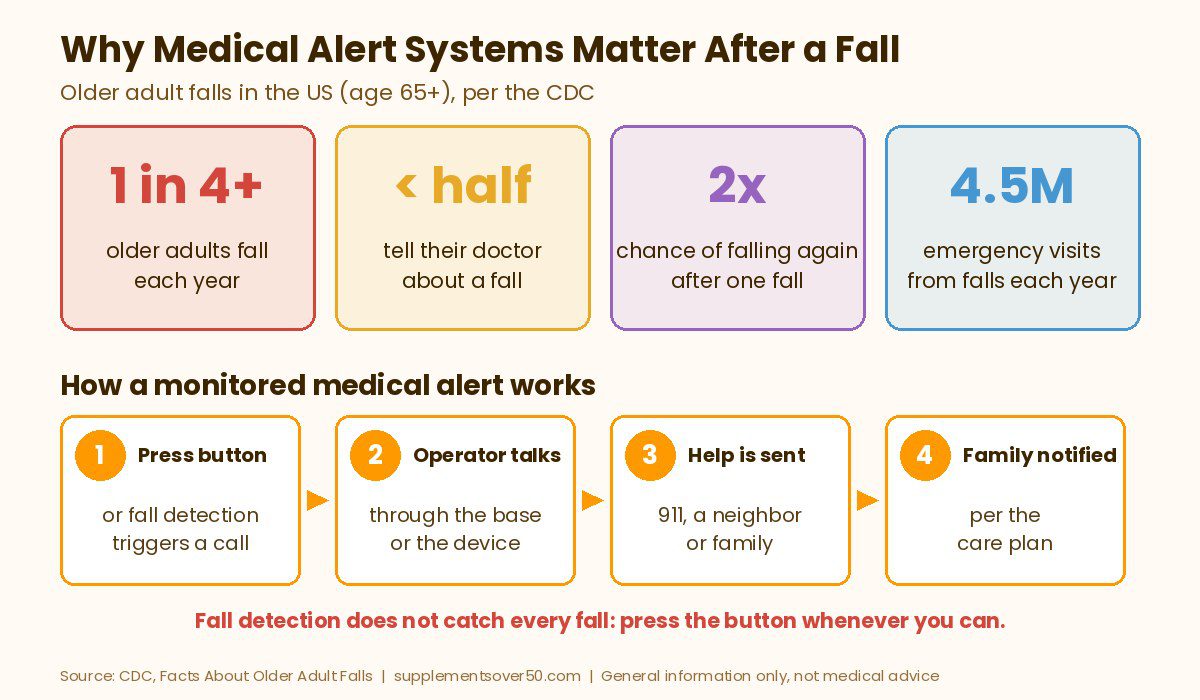
Falls are the main reason families look at these devices, and the numbers are sobering. According to the CDC’s Facts About Older Adult Falls, more than one in four adults age 65 and older falls each year, but less than half tell their doctor. Falling once doubles the chance of falling again.
Falls are common and costly. CDC reports about 4.5 million emergency department visits each year from falls in older adults, with 1.4 million hospitalizations.
Hip fractures are a big risk. Nearly 319,000 older adults are hospitalized for hip fractures each year, and CDC says falls caused 88% of emergency visits and hospitalizations for hip fractures.
Head injuries matter. Falls are the most common cause of traumatic brain injuries in older adults, and CDC notes head injuries can be especially serious for people on blood thinners.
Fear of falling feeds the cycle. People who fall often cut back on activity, get weaker and become more likely to fall again.
A medical alert system does not prevent falls. What it does is shorten the time between a fall and help arriving, which matters most for anyone who lives alone or spends long stretches of the day by themselves.
How Medical Alert Monitoring Works
Almost every system on this list works the same basic way. The wearer presses a help button on a pendant, wristband or watch. The device connects to a monitoring center over a cellular network or, for some home systems, a landline. A trained operator talks to the wearer through a speaker on the base station or the device itself, checks what is wrong, and then calls the right help: 911, a neighbor or a family member on the care plan. If the wearer cannot speak, the brands say operators send emergency help to the address on file or the GPS location.
A few terms are worth knowing:
In-home system: a base station plugs into the wall, and a waterproof button works within a set range of it. Ranges listed by these brands run from about 800 feet (MedicalAlert) to about 1,300 to 1,400 feet (LifeFone and Medical Guardian).
Mobile system: a small all-in-one device with its own cellular connection and GPS, so it works at the store, on a walk or in the car. It needs regular charging.
Fall detection: a sensor in the pendant tries to spot a hard fall and calls automatically. Every brand we reviewed states plainly that it does not detect 100% of falls, so the wearer should still press the button if they can.
Monitoring center certifications: look for UL listing and the CSAA Five Diamond designation, which several brands below cite for their US-based centers.
Self-monitored devices: some Amazon pendants skip the call center and alert family members directly. They usually cost less per month but depend on someone answering.
What to Look for in a Medical Alert System for Seniors
Where your parent spends the day. Mostly at home: an in-home system with good range and a backup battery. Out and about: a mobile GPS device.
Fall detection if they live alone. It is an add-on with most brands, usually priced per month, and it is worth it for anyone at higher fall risk.
No long-term contract. All four monitored brands here say they have no long-term contract. Read how refunds work if you cancel early.
Waterproof buttons. Bathrooms are a common place to fall. Every brand here says its wearable buttons can be worn in the shower; base stations must stay dry.
Battery life you can live with. Mobile devices listed by these brands run from about 36 hours (Bay Alarm SOS Micro) to about 5 days (Medical Guardian Guardian Flex, LifeFone VIP Active) per charge.
Total cost, not just the monthly rate. Some brands charge for the mobile device up front, and add-ons such as fall detection, extra buttons or lockboxes add up.
Caregiver tools. Apps that show location, battery level and alerts help families stay in the loop.
Top Picks for the Best Medical Alert Systems for Seniors
Each pick below is based on the brand’s own website or the Amazon listing at the time of writing. Prices appear in the text and table only, and they change often, so check current pricing before you buy.
1. Bay Alarm Medical (Best Overall Value)
Bay Alarm Medical offers the widest spread of options at a low starting price. Its line-up includes the SOS Home in-home system (landline or cellular), the SOS All-In-One 2 for protection in and away from home, the lightweight SOS Micro, and an SOS Smartwatch. At the time of writing, its site listed SOS Home from about $27.95 a month, the All-In-One 2 and SOS Micro from about $34.95 a month, and the Smartwatch from about $39.95 a month. Adding automatic fall detection to SOS Home, All-In-One or SOS Mobile costs about $10 more per month, per the brand.
Bay Alarm says it uses two US-based monitoring centers in Ogden, Utah and Rexburg, Idaho, both with the CSAA Five Diamond designation, with support for 180 languages. Its FAQ says there are no long-term contracts or cancellation fees, unused months are refunded after the device is returned (less shipping), and in-home consoles are leased at no charge but must be returned when you cancel. It is a strong default choice for families comparing on price.
BEST OVERALL VALUE
Bay Alarm Medical
In-home and mobile systems, optional automatic fall detection, two US monitoring centers with CSAA Five Diamond status, and no long-term contract, per the brand.
Medical Guardian leans into small, modern mobile devices. Its newest, the Guardian Flex, can be worn on the wrist, belt or a lanyard, includes GPS and two-way voice, and the brand says it lasts up to 5 days on a charge. The MGMove is a watch-style device with step counting and weather updates. For home use, MG Home Cellular and MG Home Landline use a base station with help buttons that work up to 1,400 feet away and a 32-hour backup battery.
At the time of writing, the site listed MG Home Landline from about $27.95 a month, MG Home Cellular from about $34.95 a month and Guardian Flex at about $39.95 a month on an annual plan, with the Flex device itself sold separately (often discounted with a promo code). Fall detection adds about $10 a month. Medical Guardian’s current Terms include a 3-month minimum commitment and cancellation by phone or mail, and its checkout lists an up-front device purchase on most systems (its older FAQ still says there are no equipment or cancellation fees, so read the Terms before you order). It uses UL-certified, 100% US-based monitoring with redundant backup centers, and monitors a second spouse pendant at no charge on some systems. It also claims response times as fast as 8 seconds; treat that as the brand’s own figure.
BEST FOR ACTIVE SENIORS
Medical Guardian
Compact GPS devices like the Guardian Flex, home systems with up to 1,400 feet of button range, optional fall detection, and UL-certified US-based monitoring, per the brand.
LifeFone has been in the medical alert business since 1976, according to its site, and its pricing stands out for fall detection. While most brands charge about $10 a month for it, LifeFone lists automatic fall detection at about $5 more per month. Its At-Home Landline plan started as low as about $24.95 a month on an annual plan at the time of writing, with a button range of up to 1,300 feet, a 32-hour backup battery on the base and a help button battery that the brand says lasts up to 3 years.
For life outside the house, the VIP Active pendant uses AT&T 4G LTE, locates the wearer with cellular, Wi-Fi and GPS, and is listed at up to 5 days of battery life, starting at about $37.95 a month on an annual plan. LifeFone lists a 30-day money-back guarantee, no activation or equipment fees, a lifetime price guarantee for subscribers, free coverage for a spouse with basic service and the ability to cancel anytime. Its response centers page says calls are answered in 15 seconds on average, which again is the brand’s claim.
BEST FOR FALL DETECTION ON A BUDGET
LifeFone
Home and mobile systems with low-cost optional fall detection, up to 1,300 feet of home range, a 30-day money-back guarantee and free spouse coverage on basic service, per the brand.
4. MedicalAlert (Best Simple, No-Commitment Home System)
MedicalAlert keeps its line-up short: a cellular Home System, a Mobile System and a Smartwatch. At the time of writing its FAQ said systems start at about $29.95 a month, with the Home System from about $29.95 and the Mobile System from about $34.95 a month. Fall detection costs about $10 more per month. The Home System needs no landline, has a help button range of up to 800 feet and a backup battery of up to 30 hours.
The Mobile System adds GPS and lasts up to four days per charge, according to the brand. MedicalAlert says there are no long-term contracts or hidden fees, though you do sign a monitoring agreement, and you can cancel anytime once the equipment is returned. Its FAQ describes redundant, Five Diamond, UL-certified US monitoring centers. Range is shorter than some rivals, so it suits smaller homes and apartments best.
BEST SIMPLE HOME SYSTEM
MedicalAlert
A cellular Home System that needs no landline, a GPS Mobile System and a Smartwatch, with optional fall detection and no long-term contract, per the brand.
5. SecuLife Medical Alert Pendant (Best for Alerts Straight to Family)
The SecuLife Medical Alert Pendant takes a different approach: there is no call center. When it detects a fall or the SOS button is pressed, it calls and notifies the emergency contacts you choose. The listing describes automatic fall detection, two-way calling with hands-free auto-answer, real-time GPS tracking with geofence alerts and a year of location history, a display showing time, battery and signal, up to 6 days of battery life and IP67 water resistance.
It is not subscription free. The listing states a monthly subscription is required, about $20 a month at the time of writing, on top of the device. Reviews are more mixed than for the big brands (3.9 out of 5 from 300+ ratings when we checked), so it fits families who are reliably reachable and want to see location themselves. If no one can always answer, a professionally monitored service is the safer choice.
BEST FOR ALERTS TO FAMILY
SecuLife Medical Alert Pendant
Fall detection, SOS two-way calling and GPS tracking that alerts your chosen contacts directly, with no call center
6. CallToU Caregiver Pager (Best When a Caregiver Lives in the Home)
If your parent lives with you or a spouse, a simple pager can cover the moments when you are in another room. The CallToU Caregiver Pager is one of the best-selling options on Amazon (4.6 out of 5 from 7,000+ ratings when we checked). This set includes two plug-in receivers and two call buttons, a range of 500+ feet in open areas, 55 ringtones, volume up to 110 dB, and waterproof buttons that can be worn on a neck strap or mounted on a wall.
Be clear about what it is not. It does not call 911, a monitoring center or a phone, and it has no fall detection. It only works if someone in the house hears the alarm. It has no monthly fee, which makes it a good add-on to a monitored plan or a standalone choice for homes where a caregiver is nearly always present.
BEST FOR IN-HOME CAREGIVERS
CallToU Caregiver Pager (2 Buttons, 2 Receivers)
Waterproof call buttons and plug-in receivers with 500+ ft range and adjustable volume, no monthly fee
A monitored alert is a great safety net, but it is not the right tool for everyone:
People who will not wear it. A button left on the nightstand does nothing. Involve your parent in picking the style, whether pendant, wristband or watch, so they actually keep it on.
People with advanced memory loss. Someone who may forget what the button is for may need in-person care, GPS location tracking or home sensors instead.
Homes with weak cell coverage. Cellular systems rely on a carrier signal. Check coverage at the address, or choose a landline base where offered.
Anyone expecting fall prevention. These devices summon help; they do not stop falls. Strength and balance work, a medication review and removing tripping hazards still matter most.
Anyone treating fall detection as foolproof. Every brand here warns that fall detection does not catch every fall.
If your parent has already fallen, CDC advises that an older person who falls and hits their head should see a doctor right away. Talk to their doctor about fall risk too, since many risk factors can be changed.
Frequently Asked Questions
What is the best medical alert system for seniors?
For most families, Bay Alarm Medical offers the best overall value, with in-home and mobile systems, optional fall detection and no long-term contract. Medical Guardian suits active seniors who want a small GPS device, and LifeFone is a good choice if you want low-cost fall detection.
How much does a medical alert system cost per month?
At the time of writing, the monitored brands in this guide listed starting prices from about $24.95 to $29.95 a month for in-home systems and about $34.95 to $39.95 a month for mobile devices. Fall detection usually adds about $5 to $10 a month. Prices change often, so check current pricing.
Is fall detection worth paying extra for?
For seniors who live alone or have fallen before, it is usually worth it, because it can call for help if the wearer cannot press the button. Every brand warns that fall detection does not catch 100% of falls, so the wearer should still press the button when able.
Do medical alert systems require a contract?
Bay Alarm Medical, LifeFone and MedicalAlert say they have no long-term contracts. Medical Guardian’s current Terms include a 3-month minimum commitment, so read the terms before you sign up. Refund rules differ: some refund unused months after you return the device, so read the cancellation terms before you sign up.
Does Medicare pay for a medical alert system?
Bay Alarm Medical says Original Medicare (Parts A and B) does not cover medical alert systems, but some Medicare Advantage plans, private insurers and long-term care policies do, and Medical Guardian suggests asking your insurer. Check with your plan directly.
Can my parent wear a medical alert button in the shower?
Yes, with the brands in this guide. Each says its wearable help buttons are water resistant or waterproof and can be worn in the shower, where many falls happen. In-home base stations are not waterproof and should stay dry.
Our Take
The best medical alert systems for seniors are the ones your parent will actually wear, backed by a reliable monitoring center and fair cancellation terms. For most families we would start with Bay Alarm Medical for value, Medical Guardian for active seniors who want a small GPS device, and LifeFone if fall detection is a must on a budget. Add fall detection for anyone who lives alone, compare total cost including devices and add-ons, and test the button together on day one so everyone knows how it works.
This article is for general information only and is not medical advice. Medical alert systems do not prevent falls, and fall detection does not detect every fall. Prices and plan terms were taken from each brand’s website at the time of writing and may change. Talk to a doctor about fall risk and call 911 in an emergency.
Our Medical Guardian reviews roundup covers every device, fall detection, monitoring, cost per month, fees, contract and cancellation terms, and alternatives.
Over the counter hearing aids explained: who they are for, OTC vs prescription, self-fitting vs preset, typical costs, where to buy and when to see a doctor.
Fall detection for seniors living alone: compare Apple Watch SE 3, Galaxy Watch9, help buttons and medical alert services, plus fees, range and battery tips.
Our Philips Lifeline review explains the name change to Lifeline, current devices, fees, contract terms and customer reviews, plus three better alternatives.
Medical alert systems for seniors with no monthly fee: 5 smartwatch, autodial and pager picks, what you give up without monitoring, and when to pay for 24/7 help.