Best Smartwatches for Seniors With Fall Detection
This guide contains affiliate links. If you buy through them, we may earn a small commission at no extra cost to you.
We have not tested these devices ourselves. This guide compiles each brand’s published specs and plan terms, CDC falls data, Apple, Samsung and Google support documentation, and patterns in verified buyer reviews.
A good smart watch for seniors with fall detection does one job that matters more than step counts or sleep scores: if your parent goes down hard and cannot get up, it gets help on the way without them having to dial. The confusing part is that two very different products are sold under the same label. Consumer smartwatches from Apple, Samsung and Google detect falls for free and call 911 or text family. Medical alert watches from companies like Bay Alarm Medical and Medical Guardian send the alert to a monitoring center staffed around the clock, for a monthly fee.
This guide compares both types side by side, explains exactly who gets the call in each case, and covers the details that decide whether a watch actually works for an older adult: cellular versus phone-tethered, battery life, and how easy it is to use under stress.
Table of Contents
Smart Watch for Seniors With Fall Detection: Quick Comparison
Prices are what Amazon and each brand’s site showed at the time of writing and change often, so check current pricing before you buy.
Popular Supplement Guides:
| Watch | Best for | Who gets the call after a fall | Needs a phone nearby? | Battery (brand claim) | Cost at the time of writing |
|---|---|---|---|---|---|
| Apple Watch SE 3 (GPS + Cellular) | iPhone users who want 911 calling anywhere | 911, then a text to emergency contacts | No, with an active carrier plan | Up to 18 hours | About $249 plus a monthly carrier fee |
| Bay Alarm SOS Smartwatch | Seniors without a smartphone | 24/7 monitoring center, which calls family or 911 | No, 4G LTE included | 6 to 18 hours | $39.95/mo, $49.95/mo with fall detection, plus a $199 device purchase |
| Samsung Galaxy Watch8 (LTE) | Samsung and other Android phone users | Emergency contacts (text with location), optional emergency call | No, with an active carrier plan | Not stated on the listing | About $300 plus a monthly carrier fee |
| Google Pixel Watch 5 (LTE) | Pixel and Android phone users | 911 with an automated location message | No, with an active LTE connection | Up to 40 hours (listing) | About $400, with a 2-year data offer from select sellers |
| Medical Guardian MG Move | Seniors who want monitoring and a simple watch | 24/7 monitoring center | No | Up to 24 hours | From $44.95/mo, fall detection extra, device purchase at checkout |
Why Fall Detection Matters After 50
Falls are the reason most families start looking at these watches. According to the CDC’s Facts About Older Adult Falls, more than one out of four older people falls each year, but less than half tell their doctor. Falling once doubles the chance of falling again.
- Falls send millions to the ER. CDC reports about 4.5 million emergency department visits each year due to falls in older people.
- Hip fractures are common. Nearly 319,000 older people are hospitalized for hip fractures each year.
- Time on the floor matters. A person who cannot get up may be stuck for hours if they live alone and no one checks in. Automatic detection is designed for exactly that moment.
- Many people will not press a button. Some are knocked out, some are confused, and some simply do not want to bother anyone. A watch that calls on its own removes that decision.
A watch is also easier to keep on than a pendant. Many older adults already wear one, it does not look like a medical device, and it stays on the wrist in the shower, where slips are common.
How Fall Detection Works on These Watches
Every watch here uses motion sensors to spot the sudden impact and stillness of a hard fall, then asks the wearer if they are OK before calling. What happens next depends on the brand.
- Apple Watch. Per Apple’s Fall Detection support page, the watch taps the wrist, sounds an alarm and shows an alert. If the wearer stays still for about a minute, it starts a 30-second countdown, then calls emergency services and sends emergency contacts a message with the location. Fall Detection turns on automatically if the wearer’s age is set to 55 or older.
- Samsung Galaxy Watch. Samsung’s support page says all Wear OS models include hard fall detection that sends an SOS when a hard fall is detected. It has to be turned on in the Galaxy Wearable app, it needs emergency contacts set up, and you can choose to text your location to contacts and add an emergency call option.
- Google Pixel Watch. Per Google’s Pixel Watch safety help page, when a hard fall is detected and the wearer does not respond after 60 seconds, the watch can call emergency services and play an automated voice message with the wearer’s location.
- Medical alert watches. The Bay Alarm and Medical Guardian watches send detected falls to the brand’s monitoring center, where an operator talks to the wearer through the watch and contacts family or 911 as needed.
No system catches everything. Apple says plainly that its watch cannot detect all falls and that high-impact activity can trigger a false alert. Slow slides from a chair or bed are the hardest to detect. Teach your parent to call for help manually whenever they can, even with fall detection turned on.
Who Gets the Call: 911, Family or a Monitoring Center
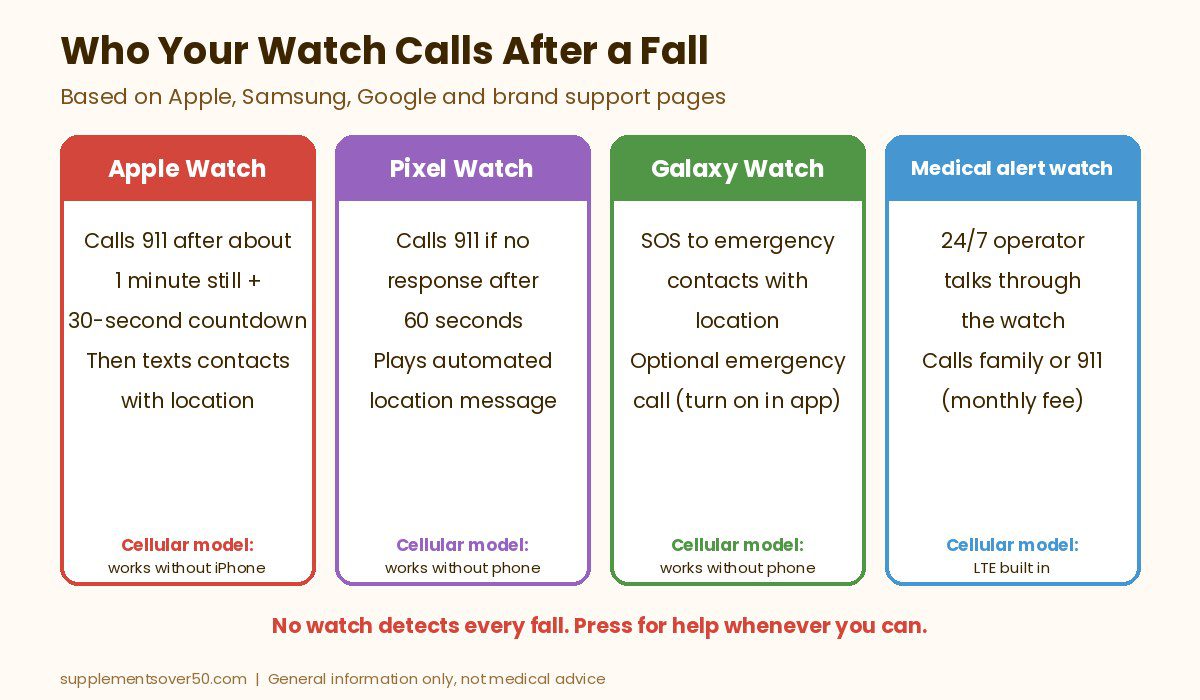
This is the single biggest difference between watch types, and it should drive your choice more than any spec.
- 911 directly (Apple, Google, optionally Samsung). Fastest route to an ambulance. The downside is that 911 dispatchers do not know your parent’s medical history, door code or which neighbor has a key, and family only hears about it afterward by text.
- Family only (Samsung’s default setup). Good when someone reliable lives nearby and answers their phone. Risky if contacts are asleep, at work or on silent.
- A monitoring center (Bay Alarm, Medical Guardian, Lifeline). A trained operator answers, speaks to the wearer through the watch, can see the care plan and calls family, a neighbor or 911 in the order you choose. This is what you pay the monthly fee for.
For a parent who lives alone, has fallen before or may not be able to explain what happened, a monitored watch or a consumer watch set to call 911 automatically is the safer setup. A family-only alert works best as a backup.
Cellular vs Phone-Tethered Watches
A GPS or Bluetooth-only smartwatch borrows its connection from the paired phone. Apple says Fall Detection needs a cellular connection, satellite or Wi-Fi Calling from the watch or a nearby iPhone, and Google says the Pixel Watch Wi-Fi model can only place an emergency call if the paired phone is nearby. If your parent leaves the phone on the kitchen counter and falls in the garden, a tethered watch may not be able to call.
That is why every consumer pick in this guide is a cellular (LTE) model. Cellular watches can call on their own anywhere with coverage, but they need a line on a carrier plan, which adds a monthly bill. Medical alert watches include their own cellular service in the monitoring fee, so there is no separate carrier account to manage. Whichever you choose, check coverage where your parent spends time.
What to Look for in a Smart Watch for Seniors With Fall Detection
- Automatic calling, not just alerts. Confirm the watch will place a call by itself if the wearer does not respond, and know who it calls.
- Cellular connection. For anyone who walks, gardens or drives without their phone, cellular is worth the extra cost.
- Battery life you can live with. Most of these watches need charging every day. Plan a routine, such as charging while they eat breakfast and get dressed, so the watch is on the wrist overnight when bathroom trips happen.
- An easy way to call for help. A dedicated physical SOS button, like the red button on the Bay Alarm watch, is easier under stress than swiping through menus.
- Readable screen and simple setup. Large text and fewer apps help. Medical alert watches strip out most features on purpose.
- Water resistance. The watch should stay on in the shower. Check the rating on each listing or spec sheet.
- Total cost and terms. Add the device price, carrier or monitoring fee, fall detection add-on and any device purchase or minimum commitment before you compare.
Top Picks: Best Smartwatches for Seniors With Fall Detection
Amazon picks are based on the live listing and each maker’s support pages. Monitored picks are based on each brand’s own product, pricing and terms pages at the time of writing. Ratings are what Amazon showed when we checked.
1. Apple Watch SE 3 GPS + Cellular (Best Overall)
For a parent with an iPhone, the Apple Watch SE 3 (GPS + Cellular) is the strongest all-round choice. The listing says it can detect a hard fall or severe car crash, help connect the wearer with emergency services and notify emergency contacts, and the cellular model can make calls even without the iPhone nearby. It was sold by Amazon, held a 4.6 out of 5 rating from 600+ reviews on this version and showed 1K+ bought in the past month when we checked. It was listed at about $249 for the 40mm size at the time of writing; check current pricing.
Fall detection turns on automatically for wearers set to age 55 or older, per Apple, and the call goes straight to emergency services after the countdown. The trade-offs: the listing quotes 18-hour battery life, so it needs a daily charge, the cellular line adds a monthly carrier fee, and it requires an iPhone for setup. If your parent always carries their iPhone, the cheaper GPS-only SE 3 gives the same fall detection when the phone is in range.
2. Bay Alarm Medical SOS Smartwatch (Best Monitored Watch)
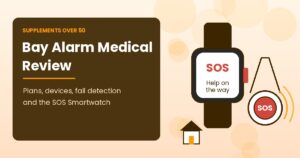
The Bay Alarm Medical SOS Smartwatch is built for seniors who do not use a smartphone and want a person on the other end. Bay Alarm says the watch does not pair with a phone, has 4G LTE included in the package, and has a bright red physical SOS button on the side: hold it for 5 seconds and an operator comes through the built-in speaker, tracks the location and contacts family, neighbors or 911. Automatic fall detection is an optional add-on, and the brand says it asks “Did you fall?” first so the wearer can cancel a false alarm.
Costs at the time of writing on Bay Alarm’s pricing page: $39.95 a month, or $49.95 a month with fall detection, plus a required device purchase of $199 (it was discounted when we checked). One spec table on the watch page says there are no device fees, so confirm the device charge at checkout. Bay Alarm lists battery life of 6 to 18 hours, IP67 water resistance, a 15-day trial and no long-term contract, though the device must be returned when you cancel. Bay Alarm states a monitoring center response time of 45 seconds or less, which is the brand’s own claim.
3. Samsung Galaxy Watch8 LTE (Best for Samsung and Android Phones)
If your parent uses a Samsung or other Android phone, the Samsung Galaxy Watch8 LTE is the natural match. The listing says it works with Samsung phones and other Android phones, highlights sleep coaching, a lighter design and a 2-year warranty, and the LTE model has its own cellular connection. It was sold by Amazon with a 4.4 out of 5 rating from 200+ reviews on this version and 50+ bought in the past month when we checked, at about $300 for the 40mm LTE size at the time of writing.
Samsung’s fall detection is aimed at family first. It is off by default, so you must switch on Hard fall detection in the Galaxy Wearable app and add emergency contacts. You can then choose to text your location to those contacts and add an emergency call option. Take the time to set this up together and test it, because a watch with fall detection switched off does nothing. The listing does not give battery hours, so plan on daily charging. It does not work with iPhones.
4. Google Pixel Watch 5 LTE (Best for Automatic 911 on Android)
The Google Pixel Watch 5 LTE suits Android users who want the watch itself to call 911 rather than relying on family. Per Google’s help page, if a hard fall is detected and the wearer does not respond after 60 seconds, the watch calls emergency services and plays an automated message with the location. The listing also highlights Loss of Pulse Detection, which can prompt a call to emergency services, and up to 40 hours of battery life. Emergency SOS can be triggered by pressing the crown 5 times.
It was sold by Amazon at about $400 for the 41mm LTE model at the time of writing. The listing mentions 2 years of data and texting through Google Fi on LTE models bought from select sales channels, so confirm the offer applies to your seller before you count on it. Reviews are still thin: 4.3 out of 5 from 60+ ratings when we checked, with 100+ bought in the past month. It is the priciest consumer pick here.
5. Medical Guardian MG Move (Monitored Alternative)
The Medical Guardian MG Move is a medical alert smartwatch with a help button, a cancel button for accidental presses, step counting and weather. Medical Guardian lists battery life of up to 24 hours, a water-resistant design, a 1.25 inch watch face and an optional fall detection add-on that it says can tell soft falls from hard impacts. Caregivers can see hourly location history in the member portal and real-time location when the SOS button is pressed.
Read the terms first. The product page listed it as low as $44.95 a month at the time of writing and marked it “while supplies last.” Medical Guardian’s terms include a three-month minimum service commitment, and its equipment is typically purchased at checkout, with device fees from $149.95 to $199.95 on most systems and about $199.95 for the MG Move when checked, plus a $0.99 monthly account fee. Fall detection costs extra. If the watch sells out, Bay Alarm’s SOS Smartwatch is the closest substitute.
Other Options We Considered
The Lifeline Smartwatch is another monitored watch, listed from $34.95 a month on annual plans at the time of writing, with optional fall detection, GPS and Wi-Fi location and a waterproof design. Its subscriber terms include a non-refundable three-month minimum and a one-time programming fee, so compare the first-year total. If you are searching for a Life Alert watch with fall detection, Life Alert’s site lists a pendant, a wristband button and an on-the-go GPS button, but no smartwatch, and its homepage does not mention automatic fall detection.
Amazon also sells many low-cost “senior” 4G watches that advertise fall detection and SOS calls to family. The ones we found had very few reviews and come from little-known sellers, so we could not recommend one with confidence. If you try one, buy from a seller with a clear return window and test the fall alert before relying on it.
How to Choose a Smart Watch for Seniors With Fall Detection
- If your parent has an iPhone and goes out without it, pick the Apple Watch SE 3 GPS + Cellular.
- If they do not use a smartphone at all, pick the Bay Alarm SOS Smartwatch with fall detection.
- If they use a Samsung phone and family lives close by, the Galaxy Watch8 LTE works well once fall detection and contacts are set up.
- If they use Android and you want 911 called automatically, the Pixel Watch 5 LTE is the better Android choice.
- If they live alone with a history of falls, choose a monitored watch so a trained operator handles every alert.
- If they will not charge a watch every day, a pendant-style medical alert with longer battery life may be the better fit.
For pendants, home helpers and other fall alert options, read our guide to the best fall detection devices for seniors living alone. Many of these watches also track sleep, which we cover in our picks for the best sleep trackers for adults over 50. If missed pills are a worry too, see the best medication reminder devices for seniors, and a fall detection watch is a thoughtful pick from our list of the best gifts for aging parents.
Who a Fall Detection Watch Is Not Right For
- People with memory loss. Someone who forgets to charge or wear the watch, or is confused by alerts, needs a simpler monitored device and in-person support.
- People who will not wear anything on the wrist overnight. Many falls happen on the way to the bathroom at night. A watch on the charger cannot help.
- Homes with weak cell coverage. Cellular watches and medical alert watches both fail quietly without signal. Test calls from every room and the yard.
- Anyone treating fall detection as foolproof. Apple states its watch cannot detect all falls, and the other brands make similar caveats. It is a backup, not a guarantee.
- Anyone hoping to prevent falls. A watch summons help; it does not stop a fall. Ask a doctor about balance, strength, vision and medicines that raise fall risk.
If your parent has already fallen, mention it to their doctor. CDC notes that less than half of older people who fall tell their doctor, and a fall can be a sign of a problem that can be treated.
Frequently Asked Questions
What is the best smart watch for seniors with fall detection?
For iPhone users, the Apple Watch SE 3 GPS + Cellular is our top pick because it calls emergency services on its own after a hard fall, even without the iPhone nearby. For seniors without a smartphone, the Bay Alarm Medical SOS Smartwatch connects to a 24/7 monitoring center.
Do fall detection watches call 911 or family?
It depends on the watch. Apple and Google Pixel watches call emergency services and then alert contacts. Samsung texts emergency contacts by default, with an optional emergency call. Medical alert watches send the alert to a monitoring center, which then calls family or 911.
What are the best medical alert watches with fall detection?
Among monitored watches, the Bay Alarm Medical SOS Smartwatch and Medical Guardian MG Move both offer optional automatic fall detection with 24/7 monitoring. The Lifeline Smartwatch is another option. All charge a monthly fee and add a fee for fall detection.
Does Life Alert have a watch with fall detection?
Not that we found. Life Alert’s site lists a pendant, a wristband button and an on-the-go GPS button, but no smartwatch, and its homepage does not mention automatic fall detection. Check with Life Alert directly for current options.
Does a fall detection watch need a cellular plan?
Only if you want it to call without a phone nearby. GPS or Bluetooth models use the paired phone, while cellular models need a carrier plan. Medical alert watches include cellular service in the monthly monitoring fee.
How often do these watches need charging?
Most need a daily charge. Apple lists up to 18 hours for the SE 3, Bay Alarm lists 6 to 18 hours, Medical Guardian lists up to 24 hours for the MG Move, and Google lists up to 40 hours for the Pixel Watch 5. Pick a set charging time so the watch is worn overnight.
Our Take
The best fall detection watch is the one your parent will actually wear and charge, set up to call the right people. For an iPhone user, the Apple Watch SE 3 GPS + Cellular is the strongest choice because it calls 911 on its own. For a senior who does not use a smartphone or lives alone with a high fall risk, the Bay Alarm Medical SOS Smartwatch puts a trained operator on the other end. Android users should look at the Galaxy Watch8 LTE or Pixel Watch 5 LTE, and the MG Move is worth a look while it is available. Whatever you pick, turn fall detection on, add emergency contacts and do a test call together on day one.
This article is for general information only and is not medical advice. Fall detection does not detect every fall. Device prices, plan fees and terms were taken from Amazon and each brand’s website at the time of writing and may change. Talk to a doctor about fall risk and call 911 in an emergency.