This guide contains affiliate links. If you buy through them, we may earn a small commission at no extra cost to you.
We have not tested these devices ourselves. This guide compiles each brand’s published specs and plan terms, guidance from NCOA, Medicare.gov, Medicaid.gov and the VA, and patterns in verified buyer reviews.
⚡ Quick Answer
A monitored medical alert is only truly free when someone else pays for it: some Medicare Advantage plans, state Medicaid waiver programs, PACE, the VA for qualified veterans, or a long-term care policy. “Free equipment” offers still carry a monthly fee. If you do not qualify, our picks are the LogicMark Freedom Alert (best no-monthly-fee device that can call 911), the Daytech Wi-Fi call button (alerts family phones through a free app), the CallToU pager (cheapest, for a caregiver in the home), and LifeFone, Bay Alarm Medical or MedicalAlert for low-cost 24/7 monitoring.
If you are searching for the best free life alert systems for seniors, here is the honest answer up front: a professionally monitored system with a 24/7 call center almost always has a monthly fee, and somebody has to pay it. Sometimes that somebody is a health plan, a state program or the VA, and then it really is free to you. Sometimes “free” only means free shipping, a free first month or free equipment on loan, and the bill starts the next month.
This guide sorts out which is which. It covers who can get a medical alert system covered, what to ask your plan, which “free” offers are just marketing (and which are scams), and and the best free life alert systems for seniors who do not qualify for help, meaning genuinely no-monthly-fee devices. People say “Life Alert” for any help button, but Life Alert is one brand among many. Everything here applies whatever brand you end up with.
Table of Contents
Best Free Life Alert Systems for Seniors: Quick Comparison
Costs are what each source or brand showed at the time of writing. Programs and promotions change, so check current pricing and rules before you sign up.
Members of a plan that lists medical alerts as an extra benefit
Nothing to part of the cost, depending on the plan
The plan’s contracted monitoring company
Medicaid HCBS waiver or PACE
People who meet state income and care-need rules
Often nothing, depending on the state program
The program’s enrolled provider
VA benefit
Qualified veterans, through their VA primary care provider
Nothing if the VA approves it
Depends on the device; some dial 911 or family directly
Long-term care insurance
Policyholders whose plan covers it
Full or partial coverage, after any waiting period
The provider you choose
LogicMark Freedom Alert
People with a landline who want 911 access with no fees
About $299 once
911 dispatchers or family you program
Daytech Wi-Fi call button
Families who want alerts on their phones
About $60 once; phone and text alerts are an upgrade
Family through an app
CallToU caregiver pager
A caregiver who lives in the same home
About $38 once
Whoever carries the pager
LifeFone, Bay Alarm, MedicalAlert
Anyone who wants a 24/7 call center
Roughly $28 to $35 a month for entry plans
Trained monitoring center operators
Why a Medical Alert Matters After 50
The case for a help button is about falls first. According to the CDC’s Facts About Older Adult Falls, more than one out of four adults 65 and older falls each year, but less than half tell their doctor. Falling once doubles the chance of falling again, and the CDC says one out of 10 falls causes an injury that limits activity for at least a day.
Getting up is the hard part. Many falls are not dramatic. The danger comes when someone cannot get off the floor and cannot reach a phone.
Living alone changes the math. With no one checking in, a person who is stuck may wait for hours. A button on the wrist or neck shortens that wait.
Cost is the main reason families hold off. According to the National Council on Aging (NCOA), most monitored systems charge $20 to $60 a month, which is why so many people search for a free one.
Is a Life Alert System Ever Really Free?
Yes, but usually only through coverage. Here is what “free” tends to mean in medical alert marketing, and what it costs once the fine print kicks in.
Free equipment, paid monitoring. NCOA notes that some companies include equipment with your subscription while others charge a one-time fee. Bay Alarm’s pricing page, for example, lists the SOS Home base unit as a free device, but it is leased and must be returned when you cancel, and the monitoring itself was about $27.95 a month on a landline or $34.95 on cellular when we checked.
Free first month. LifeFone and Bay Alarm both advertised a free month at the time of writing, and LifeFone’s offer applied only to annual and quarterly plans. You still prepay the rest of the term.
Free shipping or activation. MedicalAlert said its free shipping offer applied only to semi-annual and annual plans, and that its promotional pricing covers just the first billing cycle.
“Free” through a phone call you did not ask for. This is the one to watch. New York’s Department of State warns about robocalls offering free medical alert devices that ask seniors to press 1 and give an address and credit card. Its advice: hang up without pressing any key, never give personal or Medicare details over the phone, and report the number to the FTC.
None of this makes paid systems a bad deal. It just means you should read the plan length, device terms and cancellation rules, not only the headline.
Who Can Get a Free Medical Alert System for Seniors
These are the routes that can bring the cost to zero or close to it. Coverage varies a lot by plan and state, so treat each one as “worth a phone call,” not a promise.
Medicare Advantage Plans
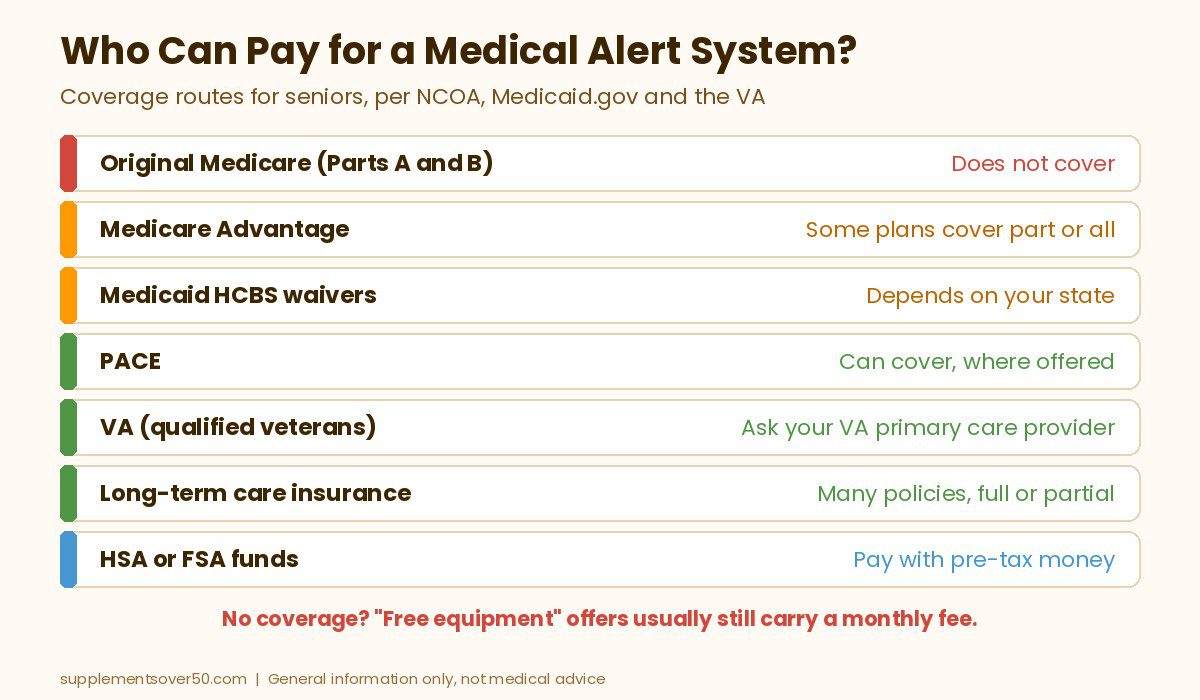
Original Medicare (Parts A and B) does not pay for medical alert systems, per NCOA. Medicare Advantage is different. Medicare.gov says most Medicare Advantage plans offer extra benefits that Original Medicare does not cover, such as vision, hearing and dental, and NCOA says some plans partially or entirely cover a medical alert system. Call your plan’s member services line, ask whether a personal emergency response system is a covered extra benefit, and ask which company you must use. Plans may require a medical reason or a doctor’s note.
Medicaid Waivers and PACE
Most Medicaid programs do not cover medical alerts as a standard benefit, according to NCOA. The opening is home and community-based services (HCBS) waivers. Medicaid.gov explains that nearly all states offer HCBS waivers to help people who need long-term care stay at home instead of moving into a facility, with about 257 waiver programs active nationwide. States choose the services, the target groups and the number of people served, so eligibility depends on where you live and on meeting the state’s level-of-care rules. Some states list a personal emergency response system (PERS) among their waiver services. Virginia’s Medicaid agency, for example, publishes a list of enrolled PERS providers.
PACE (the Program of All-Inclusive Care for the Elderly) is another route. NCOA says PACE covers all Medicare and Medicaid services plus extra services a health care professional deems necessary, and was available in 33 states and Washington, DC when it last updated its page.
VA Benefits for Veterans
NCOA says the VA offers medical alert benefits to qualified veterans and recommends starting with the veteran’s VA primary care provider. A Minneapolis VA resource guide lists the kind of criteria used: the veteran lives alone or is alone for long periods, cannot reach emergency services after a fall, has impairments (hand or arm function, vision or cognition) that make a cell phone hard to use, and has 911 access at home. Criteria and covered devices can differ by VA facility. TRICARE, the program for active duty service members, does not cover medical alerts, according to NCOA.
Long-Term Care and Private Insurance
NCOA says many long-term care insurance policies offer full or partial coverage, though some have a waiting period before benefits start. Most private health plans do not cover medical alerts, but NCOA suggests asking anyway and using the billing code S5161 (personal response systems) when you call. Some plans reimburse fees with a doctor’s recommendation.
Area Agencies on Aging and Local Programs
Local Area Agencies on Aging sometimes help pay for these devices or know which county programs do. Find yours through the Eldercare Locator, a public service of the Administration for Community Living, at 1-800-677-1116. NCOA’s BenefitsCheckUp tool can also show benefit programs in your area.
HSA and FSA Funds
This does not make a system free, but it takes the tax bite out. NCOA says many medical alert systems are HSA and FSA eligible, and Bay Alarm says it accepts HSA and FSA cards for online orders.
How to Ask Your Plan About Coverage
A five-minute call usually settles it. NCOA suggests asking these questions, and we added two that save headaches later:
Does my plan cover personal emergency response systems (code S5161)?
What percentage is covered, and is there a dollar or time limit?
Do you need a prescription or a letter of medical necessity from my doctor?
Is there a deductible or copay?
Which company do I have to use, and does the covered plan include fall detection or GPS?
What happens to the device and the bill if I leave the plan?
What to Look for in a Free or Low-Cost Medical Alert
Who answers. A monitored system reaches trained operators around the clock. Most no-fee devices ring family or a pager instead, and some can dial 911 directly. Know which one you are buying.
How it connects. Landline devices need a working home phone line. Wi-Fi buttons need the home network to stay up. Cellular systems need a signal in every room.
Shower use. Look for a clear waterproof or water-resistant statement for the button, since bathrooms are where many falls happen.
The real total. Add any device purchase, activation fee and the minimum plan length to the monthly price. A free month on a prepaid annual plan is still a year of fees.
Easy cancellation. Check whether equipment must be returned and whether you can cancel any time.
Top Picks for the Best Free Life Alert Systems for Seniors
If you do not qualify for coverage, these are the best free life alert systems for seniors and low-cost alternatives we would shortlist. The first three have no monthly fee. The last three are monitored services with low starting prices. Amazon details come from the live listings when we checked, and service details come from each brand’s own site.
1. LogicMark Freedom Alert (Best No-Fee Device That Calls 911)
The LogicMark Freedom Alert is the closest thing to a free life alert system for people who still have a landline. It is a two-way voice pendant: press the button and it dials 911 dispatchers or family members you have programmed, and you speak through the pendant itself. The listing says it uses your existing landline phone service, has no monthly fees, is rechargeable and comes with a 24-hour battery backup. It can be worn or left on its mount.
It also has an unusual credential: the Minneapolis VA resource guide lists Freedom Alert by name among medical alert resources for veterans. It was about $299 at the time of writing, held a 4.3 out of 5 rating from 500+ reviews and showed 50+ bought in the past month. The trade-offs are real: no landline, no service, and nobody at a call center will stay on the line or call your daughter if 911 is not the right call.
BEST NO-FEE 911 DEVICE
LogicMark Freedom Alert Personal Emergency Device
Two-way voice pendant that calls 911 or programmed family over your landline. No monthly fees, rechargeable, 24-hour battery backup.
2. Daytech Wi-Fi Caregiver Call Button (Best for Alerts on Family Phones)
The Daytech Wi-Fi Caregiver Call Button set includes two buttons, a wrist button and a plug-in receiver. When your parent presses a button, the receiver sounds an alarm and you get a notification in the free app, and you can share alerts with other family members. The listing describes it as buy once, with app notifications included.
Read one detail closely: app alerts need an internet connection on your phone, and the listing says phone call and text message notifications are an upgrade, so check what that costs before relying on it. It was about $60 when we checked, with a 4.3 out of 5 rating from 1,000+ reviews and 200+ bought in the past month. It does not call 911 and no professional answers, so it suits families who will respond quickly.
BEST FOR FAMILY PHONE ALERTS
Daytech Wi-Fi Caregiver Call Button Set
Two buttons, a wrist button and a receiver. Free app alerts shared with family; phone and text alerts are an optional upgrade.
3. CallToU Caregiver Pager (Cheapest, for a Caregiver at Home)
The CallToU Caregiver Pager is the simplest and cheapest option: two call buttons and two plug-in receivers. The listing quotes an open-area range of 500+ feet, 55 ringtones, adjustable volume up to 110 dB, and waterproof, dustproof buttons that can be worn on a neck strap or mounted on a wall. It was about $38 at the time of writing, with a 4.6 out of 5 rating from 7,300+ reviews and 2K+ bought in the past month, which makes it the best-selling device in this guide.
It only works if someone in the home hears the receiver. For a spouse or adult child who lives with your parent, that is often enough. For someone who lives alone, it is not a medical alert system at all.
CHEAPEST OPTION
CallToU Caregiver Pager, 2 Buttons and 2 Receivers
Waterproof call buttons and loud plug-in receivers with 500+ feet of open-area range. Best when a caregiver lives in the same home.
LifeFone is our pick when you want professional monitoring at a low price. Its homepage lists no activation or equipment fees, a 30-day money-back guarantee, cancel any time, spouses protected free with basic service, and automatic fall detection for just $5 more a month. At the time of writing it also advertised a free month, free activation and free shipping on annual and quarterly plans.
That is about as close to “free equipment” as monitored service gets without strings around a device purchase. You still pay the monthly fee, so compare the annual total against Bay Alarm and MedicalAlert before you commit.
BEST LOW-COST MONITORING
LifeFone Medical Alert
24/7 US-based monitoring with no activation or equipment fees, a 30-day money-back guarantee and low-cost fall detection, per the brand.
5. Bay Alarm Medical SOS Home (Best Free In-Home Equipment)
Bay Alarm Medical leases its SOS Home base unit free of charge, with a help button that can be worn as a necklace or on the wrist. At the time of writing the pricing page listed SOS Home Landline at about $27.95 a month and SOS Home Cellular at about $34.95, or $44.95 with fall detection (which adds a fall detection button with a $30 device fee). The base unit must be returned when you cancel.
Watch the mobile models: the SOS All-In-One 2 and SOS Micro required a $149 device purchase (discounted when we checked) and the SOS Smartwatch $199. If a free device matters to you, stick with SOS Home. Bay Alarm also accepts HSA and FSA cards.
BEST FREE IN-HOME EQUIPMENT
Bay Alarm Medical SOS Home
In-home system with a leased base unit and a help button worn on the neck or wrist. Landline or cellular, optional fall detection, 24/7 US-based monitoring, per the brand.
MedicalAlert says its systems start at $29.95 a month, with prices varying by system, rate plan and add-ons. Its help buttons are waterproof up to one meter of water for 30 minutes, and its operators can use a translation line for real-time help in 140 languages, which matters for families whose parent is more comfortable in another language.
Promotions on its site applied only to the first billing cycle, and free shipping only to semi-annual and annual plans, so read the offer terms before ordering.
BEST FOR LANGUAGE SUPPORT
MedicalAlert
Monitored in-home and mobile systems with waterproof help buttons and operator translation in 140 languages, per the brand.
Free Lifeline Medical Alert for Seniors: What the AARP Discount Covers
Lifeline does not offer a free system, but AARP members get a real discount. AARP’s Lifeline benefit page says members save 15 percent on medical alert service and get free shipping and activation. You can order through Lifeline’s AARP member page after verifying membership. The fine print on Lifeline’s AARP page also describes a standard setup fee made up of a $50 activation fee and a $49.95 programming fee, so ask exactly which fees the member offer waives.
AARP’s second medical alert benefit is IRIS Ally from Consumer Cellular: its AARP page says members save 5 percent on monthly subscription fees. Neither discount makes the service free, but for a long-term subscriber the savings add up.
How to Choose the Best Free Life Alert Systems for Seniors
If your parent has Medicare Advantage, call the plan first. A covered system beats any deal on this page.
If they are on Medicaid or need help at home, ask your state Medicaid office or Area Agency on Aging about HCBS waivers and PACE.
If they are a veteran, start with their VA primary care provider.
If they have a landline and want 911 access without fees, pick the LogicMark Freedom Alert.
If family lives nearby and has smartphones, the Daytech Wi-Fi button sends alerts to everyone at once.
If a caregiver lives in the home, the CallToU pager does the job for the least money.
If they live alone and nobody qualifies for coverage, pay for monitoring. LifeFone and Bay Alarm SOS Home are the low-cost starting points.
People who live alone with no one nearby. A pager or app alert depends on a family member seeing it. Without that, pay for monitoring or pursue coverage.
Homes without a landline or reliable Wi-Fi. The Freedom Alert needs a landline and the Daytech button needs the home network. A cellular monitored system is the safer fit.
People with memory loss. Someone who forgets what the button does needs more support, such as caregiver check-ins or a monitored system with automatic fall detection.
Anyone who would answer a “free device” robocall. Real coverage comes from your plan, the VA or a state program, never from a cold call asking for a credit card.
If your parent has already fallen, tell their doctor. The CDC notes that less than half of older adults who fall do, and a doctor can check balance, vision, strength and medicines that raise fall risk.
Frequently Asked Questions
Are there any free life alert systems for seniors?
Yes, through coverage. Some Medicare Advantage plans, state Medicaid waiver programs, PACE, VA benefits and long-term care policies pay part or all of the cost. Without coverage, a professionally monitored system has a monthly fee, though no-fee devices that call family or 911 are available.
Does Medicare cover medical alert systems?
Original Medicare does not, according to NCOA. Some Medicare Advantage plans partially or fully cover one as an extra benefit. Call your plan, ask about personal emergency response systems (code S5161), and ask whether you need a doctor’s note.
Does Medicaid pay for a medical alert system?
Sometimes. Most standard Medicaid programs do not, but some states offer medical alerts through home and community-based services waivers for people who need long-term care at home. Contact your state Medicaid office or local Area Agency on Aging.
Can veterans get a free medical alert system?
Qualified veterans can. NCOA says the VA offers medical alert benefits and suggests starting with the veteran’s VA primary care provider. Typical criteria include living alone and having trouble using a phone after a fall. TRICARE does not cover them.
Is a free medical alert necklace offer by phone legitimate?
Be very careful. New York’s Department of State warns about robocalls offering free medical alert devices that ask for a credit card. Hang up without pressing any key, never share Medicare or financial details, and report the number to the FTC.
What is the best medical alert with no monthly fee?
For 911 access over a landline, the LogicMark Freedom Alert. For alerts to family phones, the Daytech Wi-Fi call button. For a caregiver in the same home, the CallToU pager. None of them connects to a 24/7 monitoring center.
Our Take
The best free life alert system for a senior is the one a health plan, state program or the VA pays for, so make those calls first. Most families will find that Medicare Advantage, Medicaid waivers, PACE or VA benefits are the only routes to a truly free monitored system, and that “free” ads usually mean free equipment with a monthly fee attached. If nobody qualifies, the LogicMark Freedom Alert is the strongest no-fee option for 911 access, the Daytech and CallToU buttons work well when family is close by, and LifeFone or Bay Alarm’s SOS Home keep professional monitoring affordable for anyone who lives alone.
This article is for general information only and is not medical, insurance or financial advice. Coverage rules vary by plan and state. Device prices, plan fees and terms were taken from each brand’s website, Amazon and the sources linked above at the time of writing and may change. Call 911 in an emergency.
Oticon vs Phonak compared: sound processing, Bluetooth, battery life, tinnitus features, styles and cost, plus lower-cost OTC options if your loss is mild.
Best Buy hearing aids explained: which OTC models it carries, its 60-day hearing aid return policy, what in-store help to expect, and the picks worth buying.
Over the counter hearing aids explained: who they are for, OTC vs prescription, self-fitting vs preset, typical costs, where to buy and when to see a doctor.
Our Philips Lifeline review explains the name change to Lifeline, current devices, fees, contract terms and customer reviews, plus three better alternatives.