This guide contains affiliate links. If you buy through them, we may earn a small commission at no extra cost to you.
We have not tested these devices ourselves. This guide compiles each brand’s published specs and plan terms, CDC falls data, and patterns in verified buyer reviews.
⚡ Quick Answer
The Silent Beacon is a small wearable panic button that pairs with your smartphone over Bluetooth and uses the phone’s cell service to call one number (family or 911) and text your GPS location to contacts. It works best for active, phone-savvy adults who always have their phone within reach. It has no fall detection, it only works when the phone is nearby, on and connected, and buyer reviews are split. For an older parent living alone, a monitored system that works without a phone, such as Bay Alarm Medical, is the safer choice. For alerts inside the home with no monthly fee, a Wi-Fi call button like the Daytech Caregiver Call Button is a simpler option.
Silent Beacon makes one of the few wearable panic buttons that can call 911 directly without a monitoring subscription. That pitch catches the eye of adult children shopping for an aging parent, and of older adults who want something lighter and cheaper than a traditional medical alert. But the Silent Beacon is built very differently from a classic medical alert system, and those differences matter most for the people who need help fastest.
This Silent Beacon review covers what the device is, how it connects to your phone, what the free and paid app plans include, who actually gets the alert, battery life and water resistance, and what buyers report on Amazon, Trustpilot and the BBB. We finish with two alternatives: a monitored system that works without a phone and a no-fee in-home call button. Facts come from Silent Beacon‘s own product, plan, support and warranty pages and the review pages we opened at the time of writing.
Table of Contents
Silent Beacon at a Glance
What it is: the Silent Beacon 2.0, a small rechargeable Bluetooth panic button with a built-in speaker and microphone. It comes with an 18 mm wristband, an accessory clip and a USB-C cable.
How it works: it pairs with the free Silent Beacon app on an iPhone or Android phone. The phone does the calling and texting, using its own cell or Wi-Fi service.
Who it alerts: one phone call to a number you choose (a family member or 911), plus text, email and push alerts with your GPS location. Professional 24/7 monitoring is only included on the paid Pro plan.
Cost: about $59.99 for the device on Silent Beacon’s site and Amazon at the time of writing. The basic app is free; paid tiers run from about $4.99 to $12.99 a month.
No fall detection: none of the Silent Beacon pages we read list automatic fall detection. The wearer has to press and hold the button.
Ratings we saw: 3.0 out of 5 from about 110 Amazon ratings, 2.9 out of 5 from 25 Trustpilot reviews, and a B- rating (not accredited) on the BBB.
How the Silent Beacon Panic Button Works
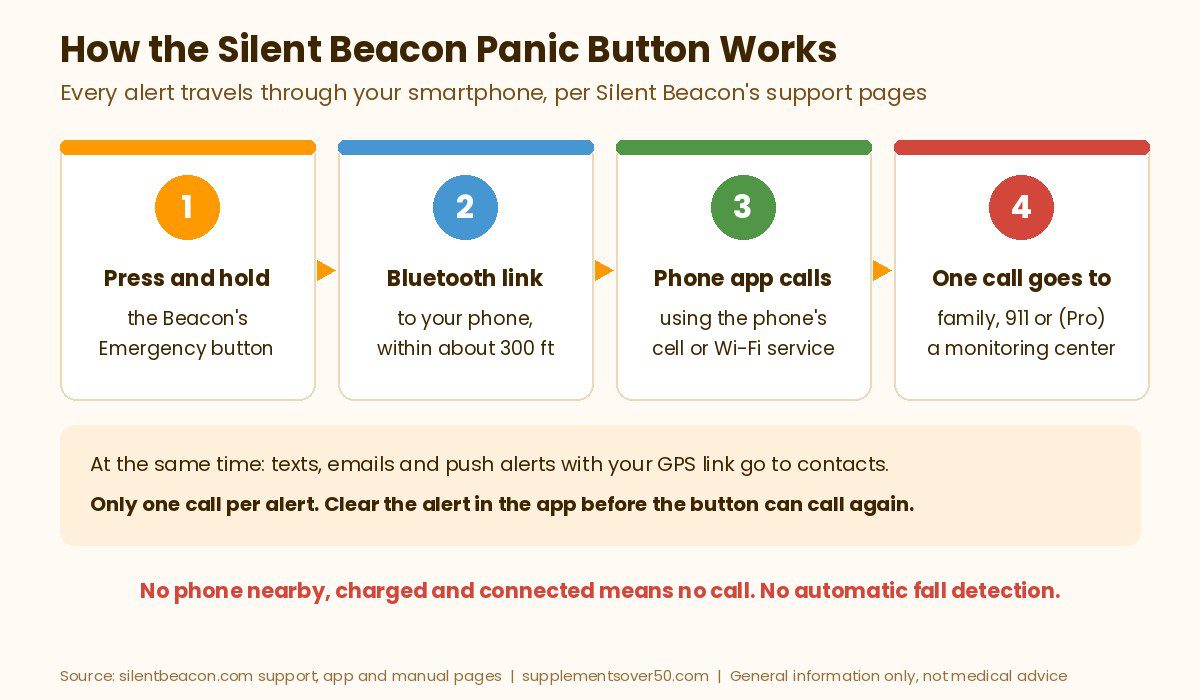
The Beacon itself has no cellular radio or SIM card. It is a Bluetooth remote for your smartphone. Silent Beacon’s support page says the button must stay within about 300 feet of the phone (in open air), and that the phone needs Bluetooth and cellular data, because the Beacon cannot make calls on its own. The 2.0 manual adds that you need a compatible iOS or Android phone with Bluetooth 5.0 and an active cell or Wi-Fi service plan.
Pressing the raised Emergency Alert button tells the app to place a call to your chosen emergency number, either 911 or a personal contact. You talk through the Beacon’s speaker and microphone, so you do not have to dig out the phone. At the same time, the app sends text, email and push notifications with a link to your GPS location to your emergency contacts. A second, smooth button handles the extra modes: Silent Mode (help is called with no sound from the Beacon), Check-In (sends your location for non-emergencies), and Footsteps (shares a live location trail).
There are two important limits in Silent Beacon’s own troubleshooting guide. First, the Beacon places only one call per alert; more contacts can get text alerts, but only on a paid plan. Second, after an alert you must cancel Alert Mode in the app with a four-digit PIN before the button can trigger a new alert. In practice, if that one call is not answered, pressing the button again does not start another call until someone clears the alert on the phone. Silent Beacon also recommends keeping the app open in the background, saying secondary features are limited when it is closed.
Why This Matters More After 50
Most families shop for a panic button because of falls. According to the CDC’s Facts About Older Adult Falls, more than one in four adults 65 and older falls each year, but less than half tell their doctor. Falling once doubles the chance of falling again, and CDC counts about 4.5 million emergency department visits and 1.4 million hospitalizations a year from falls in older adults.
That is where the Silent Beacon’s design gets tricky for seniors. A fall at home often happens in the bathroom or at night, when a phone may be charging in another room. The Beacon depends on that phone being within range, switched on, charged and connected, and it has no automatic fall detection to send help if the wearer cannot press and hold the button. Silent Beacon’s manual is blunt about this: it says the system is not a replacement for 911 and that delivery of alerts is not guaranteed, because service depends on cellular access, network connectivity and GPS.
Silent Beacon Plans and Cost
You buy the Beacon once, then choose an app plan. These are the plans listed on Silent Beacon’s app page at the time of writing. Subscriptions are billed monthly through the App Store or Google Play, and Silent Beacon says you can cancel anytime in your phone’s subscription settings. Check current pricing before you buy.
Plan
About per month
Emergency contacts
What it adds
Basic
Free
1 contact plus 911
GPS location sharing, 90 days of activity history
Plus
$4.99
5 contacts plus 911
Footsteps live tracking, Check-In, Fake Call (US only), low battery alerts, 1 year of history
Pro
$9.99
7 contacts plus 911
Everything in Plus, plus 24/7 professional monitoring (US and Canada)
International
$12.99
7 contacts in any country
Plus features for contacts with a different country code; no monitoring or Fake Call
The device itself was about $59.99 on silentbeacon.com and on Amazon. Over a year, the Beacon plus the Pro plan works out to roughly $180, which is still far less than most monitored medical alerts. The catch is what you get for that money, covered next.
Two details are easy to miss. Low battery text alerts are only on Plus, Pro and International, so a Basic user gets no text warning when the Beacon is running low. And the Beacon-to-Beacon feature, where a family member’s own Beacon vibrates and flashes when you trigger an alert, needs a subscription on both devices.
Who Gets the Alert: Family, 911 or a Monitoring Center
With a traditional medical alert, every button press goes to a trained operator. With the Silent Beacon, you decide where the single call goes:
A family member or friend. Good if someone is almost always reachable. If they miss the call, the wearer is left waiting, because the button cannot dial again until the alert is cleared in the app.
911. Silent Beacon says the Beacon can call 911 directly. The wearer has to be able to speak and explain where they are, although contacts still receive the GPS link by text.
The 24/7 Monitoring Center (Pro only). Pro adds a professional monitoring contact in the US and Canada. Silent Beacon’s guide notes it only appears in your contacts after you add a valid home address to your profile.
The monitoring call still travels through the paired phone. So even on Pro, a dead phone, a phone left in another room or a dropped Bluetooth connection means no call.
Battery, Water Resistance and Range
Battery: Silent Beacon lists up to 42 days on standby and about 3 hours to fully charge over USB-C. Its product FAQ says over a month on standby, or well over two months for someone using it 8 hours a day, 5 days a week.
Phone battery: the Beacon’s long battery does not help if the phone dies. Bluetooth and the app running in the background add to the phone’s daily drain.
Water resistance: the Amazon listing says IPX4, and Silent Beacon’s own spec sheet calls it splash-resistant. The manual says not to submerge it, so it is not a button to wear in the bath the way many waterproof medical alert pendants are.
Range: about 300 feet from the phone in open air. Walls and floors usually shorten Bluetooth range, so test it from the bathroom and bedroom.
Size: it is small. Several Amazon reviewers said it was smaller than they expected, which suits discreet wear but can make the button harder for stiff or arthritic fingers.
Warranty and returns: a one-year limited warranty on the Beacon (US and Puerto Rico purchases), which excludes normal battery wear and accessories, and a 30-day return window for website orders. Amazon purchases are returned through Amazon.
Silent Beacon Reviews: What Buyers Report
Public reviews of the Silent Beacon are split down the middle. On the Silent Beacon listing on Amazon we checked (sold by Silent Beacon), the product had 3.0 out of 5 stars from about 110 ratings, with 32% five-star and 37% one-star ratings, and 50+ bought in the past month. These patterns came up repeatedly:
Praise: buyers who liked it mentioned no monthly fee, accurate location mapping, the option to call a caregiver instead of 911, and that it works away from home or in the car with no base unit.
One call only: the most detailed one-star review described the single-call limit and said text and email alerts only went out after the phone app was opened. We could not verify that second point, but the single-call behavior matches Silent Beacon’s own guide.
Hard to press for older hands: a buyer shopping for a 92-year-old relative and another reviewer said the button is very small and hard to press and hold, which Amazon’s review summary also highlights for older users.
Pairing and setup: several reviewers reported trouble pairing to their phone or confusing instructions, while others said setup was easy.
No fall trigger: even a five-star reviewer noted it met every need except fall detection.
On Trustpilot, Silent Beacon had 2.9 out of 5 from just 25 reviews on a claimed profile. Complaints there included a Beacon stuck flashing red in alert mode after a reset and an older review about short battery life and dropped connections, while positive reviews praised quick, patient phone support. On the BBB, Silent Beacon, LLC (Rockville, Maryland) had a B- rating and is not accredited; the reason listed was failure to respond to one complaint. The review base is small on every site, so treat these as patterns rather than a verdict.
Silent Beacon Pros and Cons
Pros
Low upfront cost and a free basic plan, so there is no required monthly fee.
Can call 911 or any number you pick, with two-way talk through the button.
Works anywhere your phone has service, with no base station.
Discreet, with a Silent Mode that hides that help was called.
Long standby battery and USB-C charging.
Pro plan adds 24/7 professional monitoring for about the cost of a streaming subscription.
Cons
No automatic fall detection.
Useless without a nearby, charged, connected smartphone running the app.
One call per alert; the alert must be cleared in the app before the button can call again.
Splash-resistant only, not for the bath.
Small button that some older users find hard to press and hold.
Mixed reviews, with recurring pairing complaints.
The company says it now focuses mainly on business customers, while still selling to consumers online and on Amazon.
Silent Beacon vs a Medical Alert: Quick Comparison
Here is how the Silent Beacon compares with the two alternatives below. Prices are from each brand’s site or Amazon at the time of writing; check current pricing.
Option
Best for
Needs a phone?
Who answers
Fall detection
Cost
Silent Beacon 2.0
Active adults who always carry a phone
Yes, within about 300 ft
Family, 911, or monitoring on Pro
No
About $59.99 + free to $9.99/mo
Bay Alarm Medical SOS All-In-One 2
Seniors living alone, in and away from home
No, built-in cellular
24/7 monitoring center
Optional add-on
About $34.95/mo + device purchase
Daytech Wi-Fi Caregiver Call Button
Alerts to family at home, no monthly fee
No (receiver on home Wi-Fi)
Family via chime and app alert
No
About $59.99, no monthly fee
Best Silent Beacon Alternatives (and When the Beacon Fits)
1. Silent Beacon 2.0 (Best for Phone-Savvy, Active Adults)
If the person wearing it is mobile, always has a phone in a pocket or bag, and mainly wants a fast, discreet way to reach family or 911 while walking, driving or traveling, the Silent Beacon does that job at a low cost. The Pro plan is worth adding if you want a professional to answer rather than a relative who might miss the call.
Before relying on it, test a full alert to a willing family member (Silent Beacon says not to test with 911), try pressing and holding the button with cold or tired hands, and check that the app stays allowed to run in the background on that phone.
BEST FOR ACTIVE, PHONE-SAVVY ADULTS
Silent Beacon Bluetooth Panic Button
Calls 911 or a chosen contact through your phone, sends GPS alerts by text and email, two-way talk, 42-day standby battery
2. Bay Alarm Medical SOS All-In-One 2 (Best Monitored Option With No Phone Needed)
For an older parent who lives alone, a dedicated medical alert with its own cellular connection removes the biggest Silent Beacon risk: the phone. Bay Alarm Medical‘s SOS All-In-One 2 is designed for use both at home and away, connects straight to Bay Alarm’s 24/7 US-based monitoring centers in Utah and Idaho, and includes GPS caregiver tracking with low battery notifications for family. Automatic fall detection is an optional upgrade.
On Bay Alarm’s pricing page at the time of writing, the All-In-One 2 was about $34.95 a month, or about $44.95 with fall detection, plus a device purchase listed at $149 that was being discounted. Bay Alarm offers a 15-day risk-free trial. If your parent rarely leaves home, its SOS Home system starts lower, at about $27.95 a month on a landline. Another option worth pricing is LifeFone, which advertises no activation or equipment fees and adds fall detection for about $5 more a month.
BEST MONITORED OPTION, NO PHONE NEEDED
Bay Alarm Medical SOS All-In-One 2
A mobile help button with built-in cellular and GPS that connects to 24/7 US-based monitoring, with optional automatic fall detection and a caregiver tracking app, per the brand.
If the main worry is a parent needing help at home and family can respond, the Daytech Wi-Fi Caregiver Call Button skips the phone pairing entirely. Pressing one of the buttons or the wrist button sounds a loud alarm on a plug-in receiver and sends a notification to the family’s phone through the app, and you can share alerts with other family members. The listing says phone call and text notifications are a paid upgrade, and the receiver needs 2.4 GHz Wi-Fi and an outlet.
On Amazon it had 4.3 out of 5 stars from about 1,000 ratings and 200+ bought in the past month. Buyers praised easy setup and peace of mind, but reliability and connectivity reviews were mixed, with some saying it stopped working. If a caregiver lives in the same home, the even simpler CallToU Caregiver Pager uses plug-in receivers with no Wi-Fi or app at all.
How to Choose: Is the Silent Beacon Right for You?
If you are active and your phone is always with you, the Silent Beacon is a low-cost, discreet way to reach family or 911.
If you want a professional to answer but like the Beacon’s size, add the Pro plan and keep the phone charged and close.
If your parent lives alone, is frail or has fallen before, choose a monitored medical alert with its own cellular connection and fall detection, like Bay Alarm Medical.
If your parent does not use a smartphone, skip the Silent Beacon; it cannot work without one.
If family lives nearby and you only need home alerts, a Wi-Fi call button such as the Daytech avoids any monthly fee.
If hand strength is limited, try a larger button or a pendant with an easy single press before committing.
Older adults who live alone and are at high risk of falling. There is no fall detection and no backup if the phone is out of range.
Anyone who does not keep a smartphone charged and nearby. The Beacon cannot call without it.
People with memory loss. Clearing alerts with a PIN in the app and managing pairing adds steps that can confuse.
People with weak grip or arthritis who may struggle to press and hold a small button.
Anyone who wants a button for the shower or bath. It is splash-resistant only.
If a parent has already fallen, talk to their doctor about fall risk. CDC notes that an older person who falls and hits their head should see a doctor right away, especially if they take blood thinners.
Frequently Asked Questions
Does Silent Beacon have a monthly fee?
No monthly fee is required. The Basic app plan is free and covers one emergency contact plus 911. At the time of writing, paid plans were about $4.99 a month for Plus, $9.99 for Pro with 24/7 professional monitoring, and $12.99 for International. Check current pricing in the app.
Does the Silent Beacon work without a phone?
No. The Beacon pairs with the Silent Beacon app on your smartphone over Bluetooth and uses the phone’s cell service to call and send alerts. Silent Beacon says it must stay within about 300 feet of the phone, and the phone needs Bluetooth and cellular data.
Does Silent Beacon have fall detection?
None of the Silent Beacon product, app or support pages we read list automatic fall detection. The wearer has to press and hold the Emergency Alert button. If fall detection matters, look at a monitored medical alert with a fall detection add-on.
Can the Silent Beacon call 911?
Yes. You can set 911 or any personal contact as the emergency number, and talk through the Beacon’s speaker and microphone. It places one call per alert, and the alert must be cleared in the app before the button can place another call.
Is the Silent Beacon waterproof?
Not fully. The Amazon listing says IPX4 water resistance and Silent Beacon’s spec sheet calls it splash-resistant, but the manual says not to submerge it. It is not designed to be worn in the bath.
Is the Silent Beacon a good medical alert for seniors?
It can suit active older adults who always carry a phone. For a senior who lives alone, falls easily or does not use a smartphone, a monitored medical alert with its own cellular connection and optional fall detection is the safer choice.
Our Take
The Silent Beacon is a clever, affordable panic button with a real niche: active adults who want a discreet way to reach family or 911 through the phone they already carry. The free plan and low device cost make it far cheaper than a monitored medical alert, and the Pro plan adds professional monitoring for very little. But for most seniors, especially those living alone, its weak spots land exactly where it counts. It has no fall detection, it depends on a nearby charged phone, it makes only one call per alert, and buyer reviews flag pairing trouble and a small button that is hard for older hands to press. If that describes your parent, a monitored system like Bay Alarm Medical is the better buy, and a Daytech call button is a solid no-fee option at home.
This article is for general information only and is not medical advice. Panic buttons and medical alert systems do not prevent falls, and no device guarantees that help will arrive. Prices and plan terms were taken from each brand’s website or Amazon at the time of writing and may change. Call 911 in an emergency.
Looking for a smart watch for seniors with fall detection? We compare Apple, Samsung, Pixel and monitored medical alert watches: who they call, cost and battery.
Best Buy hearing aids explained: which OTC models it carries, its 60-day hearing aid return policy, what in-store help to expect, and the picks worth buying.
Our Philips Lifeline review explains the name change to Lifeline, current devices, fees, contract terms and customer reviews, plus three better alternatives.
Sleep tracker for seniors picks: Apple Watch SE 3, Fitbit, Oura and RingConn compared on comfort, battery, subscriptions and what trackers cannot tell you.
Life alert cost explained: reported monthly prices, the one-time fee, the three-year contract, no fall detection, and cheaper alternatives that cost far less.
The best medical alert necklace for seniors: waterproof monitored pendants with fall detection, an engraved ID option, real costs and how to get one free.